Choosing the best monitors for trading means prioritizing screen space, clarity, and responsiveness to handle multiple data streams and charts efficiently. The following selected monitors offer ultrawide and curved displays, fast refresh rates, adaptive sync technologies, and excellent color accuracy—key features essential to a productive trading setup.
| Monitor | Size & Aspect Ratio | Refresh Rate | Resolution | Panel Type | Key Features |
|---|---|---|---|---|---|
| Samsung ViewFinity S50GC | 34″ Ultrawide, 21:9 | 100Hz | Ultra WQHD (3440×1440) | VA | HDR10, Eye Saver, FreeSync, Borderless Design |
| Kado Triple 27″ Curved Setup | 27″ x3, 16:9 each | 75Hz | 1920×1080 | VA | Curved 1500R, VESA Mount, Built-in Speakers |
| INNOCN 49″ Ultrawide 32:9 | 49″ Ultrawide, 32:9 | 144Hz | 3840×1080 | VA | HDR400, USB-C, Adaptive Sync |
| Deco Gear 34″ Curved Ultrawide | 34″ Ultrawide, 21:9 | 100Hz | 3440×1440 | VA | HDR, 1ms, PIP/PBP, Adjustable Stand |
| Sceptre 34″ Curved Ultrawide WQHD | 34″ Ultrawide, 21:9 | Up to 165Hz | 3440×1440 | VA | 1ms MPRT, Picture by Picture, LED Backlight |
Samsung 34″ ViewFinity S50GC Ultra-WQHD Monitor

The Samsung ViewFinity S50GC delivers a 34-inch ultrawide display with a 21:9 aspect ratio, perfect for managing multiple trading windows seamlessly. The Ultra WQHD resolution offers crisp detail and plenty of screen real estate to monitor charts, news feeds, and order books simultaneously. It supports 100Hz refresh rate and has a fast 5ms response time, aided by AMD FreeSync for smooth image transitions.
Notable features include HDR10 support with over 1 billion colors for deeper color depth and contrast, making it easier to distinguish market indicators and color-coded charts. The monitor includes eye care technologies like an ambient light sensor, Eye Saver Mode to reduce blue light exposure, and Flicker-Free technology, essential for long trading sessions.
Kado Triple 27″ Curved Monitor Setup

This triple monitor kit features three 27-inch 1080p curved screens with a 1500R curvature designed to reduce peripheral distortion. For traders who prefer multiple discrete displays over an ultrawide single panel, this setup creates an immersive and expansive visual workspace, ideal for managing complex trading platforms, multiple brokerages, or varied asset classes.
The monitors offer a 75Hz refresh rate and built-in speakers, reducing setup complexity. The ergonomic curve enhances comfort by lessening eye strain and neck fatigue during extended periods, supported by VESA mounting options for customizable ergonomics.
INNOCN 49″ Curved Gaming Ultrawide Monitor

The INNOCN 49C1G ultrawide monitor boasts an expansive 49-inch curved VA panel with a 32:9 aspect ratio and dual full HD resolution (3840×1080). This display provides double the horizontal workspace compared to typical 16:9 monitors, ideal for multifaceted trading environments requiring simultaneous monitoring of charts, news, and analytics.
Its 144Hz refresh rate combined with Adaptive-Sync and HDR400 technology ensures smooth visuals with enhanced contrast and color accuracy, critical for distinguishing subtle chart patterns. Connectivity options include USB Type-C, DisplayPort, and HDMI, supporting ease of use with laptops and trading consoles. Height and tilt adjustments provide ergonomic flexibility.
Deco Gear 34” Curved Ultrawide Business Monitor
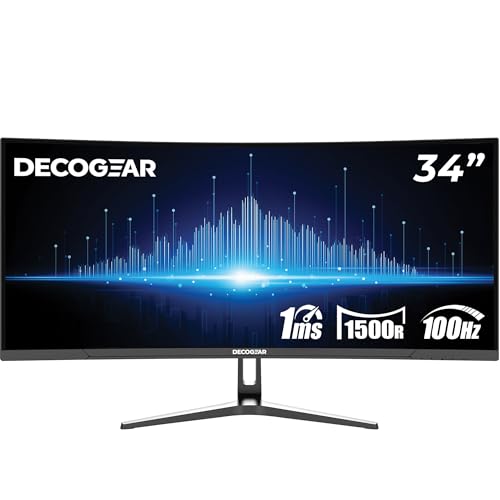
The Deco Gear 34-inch curved ultrawide monitor presents a 3440×1440 resolution in a 21:9 format, effectively substituting two standard monitors. It’s designed to boost trading productivity by allowing side-by-side application views without unnecessary alt-tabbing.
With a 100Hz refresh rate and 1ms response time, the monitor supports fast, fluid visuals—aiding traders in reacting quickly to market changes. The 1500R curved VA panel reduces eye strain, and HDR support delivers enhanced color and contrast clarity. Additional features include PIP/PBP modes and an adjustable stand for personalized setups.
Sceptre 34-Inch Curved Ultrawide WQHD Monitor

The Sceptre C345B-QUT168 is a 34-inch curved ultrawide monitor with WQHD (3440×1440) resolution, featuring an impressive 1ms MPRT response time that virtually eliminates motion blur and ghosting. This attribute benefits traders tracking real-time data or fast-moving graphs and candlestick charts.
The display is complemented by vibrant 99% sRGB coverage and unique luminous backcover LED lighting that enhances the workspace atmosphere. It supports Picture by Picture (PBP) functionality, allowing users to simultaneously view inputs from two different sources, a useful feature for multi-platform trading setups.
Buying Guide for Choosing the Best Trading Monitor
- Screen Size and Aspect Ratio: Ultrawide (21:9 or 32:9) monitors provide expansive horizontal space to arrange multiple charts, software windows, and data feeds side by side, reducing the need for multiple monitors.
- Resolution: Higher resolutions like WQHD (3440×1440) or dual full HD (3840×1080) deliver sharper visuals and more workspace, which is essential for detailed financial charts and dashboards.
- Refresh Rate and Response Time: Fast refresh rates (100Hz and above) and low response times (1ms to 5ms) ensure smooth transitions and clear visuals when monitoring rapidly changing market data, minimizing motion blur and ghosting.
- Panel Technology: VA panels offer high contrast ratios ideal for distinguishing market indicators, while IPS/ADS panels provide better color accuracy and wider viewing angles, important for color-coded alerts and collaborative trading desks.
- Eye Care Features: Technologies like flicker-free screens, blue light filters, and ambient light sensors reduce eye strain during long hours in front of the screens, enhancing comfort and reducing fatigue.
- Connectivity: Multiple DisplayPort, HDMI, and USB-C ports increase versatility for connecting laptops, peripherals, and other devices seamlessly.
- Ergonomics: Adjustable stands, VESA compatibility, and curved designs contribute to better posture and viewing comfort over extended trading sessions.
- Multi-Input and Multi-Display Support: Features such as Picture in Picture (PIP) or Picture by Picture (PBP) enable optimal multitasking, allowing efficient access to several trading platforms concurrently.
Carefully weighing these factors helps traders select monitors tailored to their workflow requirements, ensuring enhanced productivity and comfort in high-stakes trading environments.