Choosing the best monitor for photographers is essential for color accuracy, image sharpness, and efficient workflow. Whether you’re editing photos or retouching images, a monitor that covers wide color gamuts and supports advanced calibration delivers the true representation you need. Below is a summary table of carefully selected monitors optimized for photography professionals and enthusiasts.
| Monitor | Size & Resolution | Color Accuracy | Special Features |
|---|---|---|---|
| ASUS ProArt Display PA278QV | 27″ WQHD (2560×1440) | 100% sRGB, 100% Rec.709, ΔE < 2 | Calman Verified, Adjustable Stand |
| BenQ SW242Q 24-inch 2K | 24″ 2K (2560 x 1600) | 99% Adobe RGB, 100% sRGB, ΔE ≤ 1.5 | Hardware Calibration, 16-bit 3D LUT |
| BenQ PD3205U 32″ 4K UHD | 32″ 4K UHD (3840 x 2160) | 99% sRGB, Rec.709, ΔE ≤3 | Pantone Validated, ICC Sync |
| LG 27UP600-W 27″ 4K UHD | 27″ 4K UHD (3840 x 2160) | Up to 95% DCI-P3 | HDR10 Support, Flicker Safe |
| ASUS ProArt 27″ 5K HDR PA27JCV | 27″ 5K (5120 x 2880) | 99% DCI-P3, 100% sRGB, ΔE < 2 | USB-C PD 96W, Calman Verified |
ASUS ProArt Display PA278QV 27” WQHD Monitor

The ASUS ProArt Display PA278QV offers a 27-inch WQHD (2560 x 1440) IPS screen with an elegant frameless design, delivering crisp and vibrant display quality. It covers 100% of the sRGB and Rec. 709 color gamuts which are critical for photographers working with both web and broadcast content. Factory calibration ensures a Delta E value below 2, guaranteeing color accuracy straight out of the box. Calman Verified certification validates its precision.
The monitor supports DisplayPort, HDMI, DVI-D, and Mini DisplayPort connectivity. Its ergonomic stand allows tilt, pivot, swivel, and height adjustments, enabling comfortable, long editing sessions. The anti-glare coating reduces reflections, improving usability in various lighting conditions.
BenQ SW242Q 24-inch 2K Photographer Monitor

The BenQ SW242Q caters specifically to photographers with its 24-inch 2K (2560 x 1600) screen providing a 16:10 aspect ratio for increased vertical workspace. It features 99% Adobe RGB and 100% sRGB color accuracy with Delta E ≤ 1.5, vital for professional photo editing.
BenQ’s AQCOLOR technology, 10-bit color depth, and 16-bit 3D LUT contribute to accurate and consistent color output. It supports hardware calibration through Paletter Master Ultimate software, enabling users to refine the display precisely. The monitor is TUV anti-reflective certified and includes Paper Color Sync for realistic print-preview simulation, optimizing screen-to-print workflows.
BenQ PD3205U Mac-Ready 32″ 4K UHD Monitor
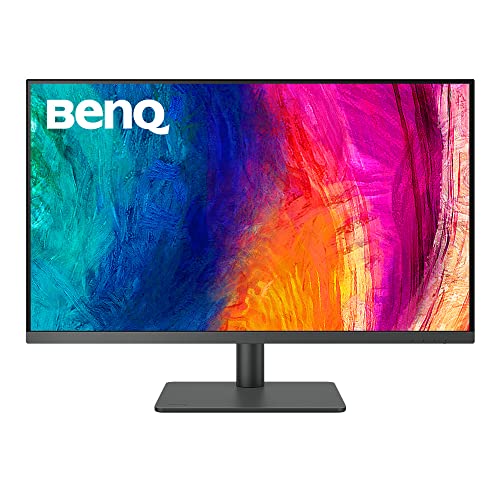
The BenQ PD3205U is a 32-inch 4K UHD IPS monitor designed for design professionals and photographers requiring large, ultra-high-resolution screens. It is factory-calibrated and accompanied by a calibration report to ensure consistent color from the start.
The monitor features 99% sRGB and Rec.709 color coverage with an average Delta E ≤ 3. Its AQCOLOR technology and Pantone SkinTone validation provide reliable color reproduction, especially for skin tones. The monitor supports ICC sync for integration with popular calibration tools. Connectivity includes DisplayPort, USB-C with 65W power delivery, and a USB hub for peripherals.
LG 27UP600-W 27-inch Ultrafine 4K UHD Monitor

The LG 27UP600-W offers 4K UHD (3840 x 2160) resolution on a 27-inch IPS display with impressive color and clarity suitable for photography. It covers up to 95% of the DCI-P3 color space, enhancing color precision for professional use and HDR content viewing.
This monitor supports HDR10, providing richer colors and deeper contrasts. Flicker Safe and Reader Mode features reduce eye strain during extended editing tasks. It has HDMI and DisplayPort inputs, making it compatible with a wide range of computers. The clean white design adds aesthetic appeal to creative workspaces.
ASUS ProArt 27” 5K HDR Professional Monitor (PA27JCV)

The ASUS ProArt PA27JCV is a top-tier 27-inch 5K HDR monitor delivering an ultra-sharp resolution of 5120 x 2880. Its IPS panel features wide-viewing angles and covers 99% DCI-P3 and 100% sRGB color gamuts, ensuring vibrant and accurate photo reproduction.
Calman verified and factory pre-calibrated with Delta E < 2 accuracy, it suits photographers needing high fidelity color grading. The monitor offers USB-C power delivery up to 96W and multiple connectivity options. Its advanced HDR capabilities support high dynamic range content, enhancing color and brightness depth for detailed image editing.
Buying Guide for Photographic Monitors
Selecting the ideal monitor for photography requires focusing on several critical aspects:
Resolution and Screen Size
- Resolution: Higher resolutions like 4K or 5K provide more pixels, improving detail visibility for fine image editing.
- Screen Size: A larger screen (27″ or above) offers more workspace but balance it with your desk space and viewing comfort.
Color Gamut and Accuracy
- Color Coverage: Look for monitors with 100% sRGB coverage as baseline. For professional work, 99% Adobe RGB or 99% DCI-P3 expands the color range for richer imaging.
- Delta E Values: Lower Delta E (<2) indicates higher color accuracy, crucial for dependable editing results.
- Factory Calibration: Monitors that come Calman or Pantone verified provide trustworthy color fidelity out of the box.
Panel Type and Viewing Angles
- IPS Panels are preferred for their superior color consistency and wide viewing angles compared to TN or VA panels.
Connectivity and Ergonomics
- Ports: HDMI, DisplayPort, and USB-C with power delivery add flexibility for connecting laptops and desktops.
- Adjustability: Height, tilt, swivel, and pivot adjustments enhance comfort during long editing hours.
- Anti-Glare Coatings: Reduce reflections that can distort colors and cause eye strain.
Additional Features
- Hardware Calibration Support: Enables precise color tuning using dedicated software and calibration devices.
- HDR Support: While not always essential, HDR provides improved contrast ratios and color brightness for specific photo and video workflows.
- Uniformity Technology: Ensures consistent brightness and color across the entire display panel.
Careful evaluation of these considerations ensures you invest in a monitor that meets the demanding color accuracy and resolution needs of photography professionals.