Finding the best monitor for RTX 4090 involves considering high resolution, refresh rates, display technology, and compatible cables. The RTX 4090 demands exceptional display setups to fully leverage its power.
| Product | Type | Key Features |
|---|---|---|
| Green Jiss 16K DisplayPort Cable 2.1 | DisplayPort Cable | VESA Certified, supports up to 16K@60Hz, 80Gbps bandwidth, HDR, FreeSync, G-Sync |
| Sceptre 34-Inch Curved Ultrawide WQHD Monitor | Monitor | 3440×1440 WQHD, 165Hz, 1ms response, 99% sRGB, Curved Ultrawide |
| Samsung 49″ Odyssey OLED G9 QD-OLED Monitor | Monitor | 5120×1440 Dual QHD, 144Hz, QD-OLED, 0.03ms, G-Sync, Curved |
| IVANKY 16K DisplayPort Cable 2.1 | DisplayPort Cable | VESA Certified, 16K@60Hz, HDR10, FreeSync, G-Sync support |
| Sceptre 30-inch Curved Gaming Monitor 200Hz | Monitor | 2560×1080 Ultra Wide, 200Hz, FreeSync, 5ms Response |
Green Jiss 16K DisplayPort Cable 2.1 – VESA Certified Cable
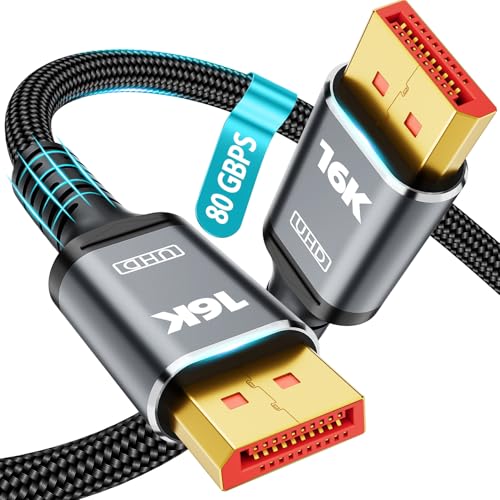
The Green Jiss 16K DisplayPort Cable 2.1 stands out with its official VESA certification for quality. It supports impressive resolutions up to 16K at 60Hz, as well as 8K at 120Hz and 4K at 240Hz. The cable is backward compatible with DisplayPort versions 1.2 through 2.0.
Offering 80Gbps bandwidth and features such as HDR, FreeSync, and G-Sync support, it is an excellent choice for gamers and high-end users with RTX 4090 or similar GPUs. The 32-bit audio enhances in-game sounds, crucial in competitive gaming. Designed for DP to DP connections only, it is optimized for longevity and future-proof performance.
Sceptre 34-Inch Curved Ultrawide WQHD Monitor – High Resolution Gaming Display

The Sceptre 34-Inch Curved Ultrawide WQHD Monitor delivers a stunning immersive experience with a resolution of 3440 x 1440 pixels and a curved 21:9 aspect ratio. This ultrawide display provides excellent screen real estate for multitasking and gaming.
It supports up to a 165Hz refresh rate with a fast 1ms response time to effectively eliminate ghosting and blurring in fast-moving game scenes. The monitor also boasts 99% sRGB color coverage for accurate and vivid visuals. Its unique luminous backcover light adds aesthetic appeal for gamers seeking stylish setups.
Samsung 49″ Odyssey OLED G9 Dual QHD QD-OLED Curved Gaming Monitor

The Samsung Odyssey OLED G9 is a premium monitor featuring a massive 49-inch Dual QHD (5120 x 1440) resolution with QD-OLED technology. The ultra-wide 32:9 screen is designed for immersive gaming and professional work requiring expansive screen real estate.
Its 144Hz refresh rate and ultra-fast 0.03ms response time minimize motion blur and input lag. The QD-OLED panel provides a wider color gamut and deep true blacks, delivering detailed shadow performance and exquisite contrast. It also supports AMD FreeSync Premium Pro and Nvidia G-Sync for smooth tear-free gaming, making it an excellent companion for RTX 4090 setups.
IVANKY 16K DisplayPort 2.1 Cable – High Bandwidth Gaming Cable

The IVANKY 16K DisplayPort 2.1 Cable is officially VESA certified, ensuring high-quality data transfer and compatibility. This cable supports resolutions up to 16K at 60Hz, plus 8K at 120Hz and 4K at 240Hz, with backward compatibility to earlier DP versions.
It excels in gaming scenarios with support for FreeSync, G-Sync, and variable refresh rate technologies. Other key features include HDR10, Dolby & eARC for immersive audio, and multi-stream transport for multi-monitor setups. The cable’s design prioritizes reliable, stable performance essential for RTX 4090 users requiring ultra-high detail and fast refresh rates.
Sceptre 30-inch Curved Gaming Monitor 200Hz Ultra Wide Display

The Sceptre 30-inch Curved Gaming Monitor features an ultra-wide 2560 x 1080 resolution with a 21:9 aspect ratio, providing immersive gameplay visuals. It supports a high 200Hz refresh rate over DisplayPort and up to 120Hz via HDMI 2.0, making it excellent for fast-paced gaming.
This monitor offers AMD FreeSync to reduce screen tearing and stutter, with a 5ms GTG response time to balance performance and visual clarity. Its curved design and built-in speakers enhance the gaming environment without needing external audio devices.
Buying Guide: Choosing the Best Monitor and Cable for Nvidia RTX 4090
Choosing the right monitor and DisplayPort cable for the RTX 4090 is critical for maximizing your GPU’s capabilities. Consider these major factors:
Resolution and Screen Size
The RTX 4090 supports ultra-high resolutions such as 4K, 5K, 8K, and even 16K. Monitors like the Samsung Odyssey OLED G9 (5120×1440) or Sceptre ultrawide models (3440×1440) offer large, sharp screens ideal for gaming and productivity. Higher resolution delivers more detail but may require scaling adjustments for legibility.
Refresh Rate and Response Time
High refresh rates (144Hz and above) and low response times (1ms or less) are essential for competitive gaming and smooth visuals. Monitors with 165Hz to 200Hz refresh rates like Sceptre’s curved gaming screens provide fluid motion and reduce ghosting or tearing.
Display Technology
Technologies such as QD-OLED and IPS increase color accuracy, contrast ratios, and viewing angles. The Samsung Odyssey OLED G9 uses QD-OLED for deep blacks and vibrant colors, enhancing immersion.
Adaptive Sync Technology
Ensure your monitor supports G-Sync or FreeSync to synchronize frame rates with the GPU, reducing screen tearing and stuttering during gameplay.
Connectivity and Cables
The DisplayPort cable is crucial for maintaining high bandwidth and resolution standards. With the RTX 4090, choose a VESA Certified DisplayPort 2.1 cable that supports 16K@60Hz or 8K@120Hz, like the Green Jiss or IVANKY options. Avoid using older DisplayPort versions or HDMI cables that limit bandwidth.
Multi-Monitor and Features Support
Look for cables with multi-stream transport (MST) if you plan multi-monitor setups. Features such as HDR, DSC (Display Stream Compression), and wide color gamut enhance image quality and detail.
Durability and Build Quality
Premium cables with gold-plated connectors and sturdy shielding ensure long-lasting, interference-free connections. Monitors with ergonomic stands offer adjustable comfort and reduce eye strain during extended use.
By focusing on these factors, you can choose a display and cable pairing that fully complements the power of your Nvidia RTX 4090, providing a superior gaming and visual experience.