The growing need to capture old memories from VHS, Hi8, or other analog formats often requires a compact, portable solution. This article highlights five mobile-friendly video converters that connect to your phone, tablet, or computer, turning analog footage into digital files quickly. Each product emphasizes easy setup, USB connectivity, and reliable capture capabilities for on-the-go digitization.
Summary Table of Featured Products
| Product | Brand | Key Benefit | Connectivity |
|---|---|---|---|
| Capture Card, USB Video Capture Card Device | VIXLW | USB-powered, plug-and-play, good for older tapes | USB |
| Video Converter For Mobile | JudithApp | Mobile-focused transcoding concepts | USB |
| Oassuose VHS to Digital Converter | Oassuose | 1080P capture, USB-A/USB-C compatibility | USB-A/USB-C |
| XMSJSIY RCA AV to USB C Converter | XMSJSIY | NTSC/PAL compatibility, multiple inputs | USB-C |
| Capture Card, USB Video Capture Card Device | Flsazrx | High performance, easy operation | USB |
VIXLW USB Video Capture Card — Analog To Digital

This USB video capture device is designed to digitize analog video and audio from tapes like VHS, VCR, Hi8, and DV, then output to a PC. The versatile AV to USB setup enables capturing in HD 720P with integrated audio, reducing the need for separate sound cards. Its plug-and-play design means drivers install automatically when connected to a PC, and it does not require external power. Ideal for users needing a straightforward path to preserve aging memories without complex software configurations.
Key features include: AV to USB conversion, 720P output, automatic driver installation, and a user-friendly experience that supports VHS to digital workflows. It’s particularly suitable for home archivists seeking a compact, reliable capture solution that aligns with typical PC setups on Windows or Mac environments.
What to consider
While this capture card emphasizes ease of use, check compatibility with your operating system and the kind of tapes you own. The device focuses on passive capture with basic processing; advanced editing may require separate software. Power requirements are minimal since it’s USB-powered, making it a good option for portable setups.
JudithApp Video Converter For Mobile

This product focuses on mobile-oriented video transcoding concepts, highlighting how lossless or lossy conversions impact quality. It discusses the differences between lossless, uncompressed, and lossy formats and emphasizes that some transcoding paths can preserve information if handled carefully. While not a standalone capture device on its own, it complements mobile workflows by clarifying how input and output formats relate to quality and compatibility on mobile devices.
Key considerations include understanding when transcoding can be lossless and how to preserve quality when moving between formats. This can help users plan mobile capture and editing workflows that minimize generation loss while converting to widely playable formats on smartphones or tablets. It also outlines the differences between conversion and transcoding as a concept, which can guide better file handling on the go.
What to consider
As a guide rather than a hardware solution, this product is best paired with a dedicated capture device. If you plan to edit on a mobile device, ensure your chosen capture hardware can deliver compatible video streams to your preferred mobile app or cloud storage service.
Oassuose VHS to Digital Converter
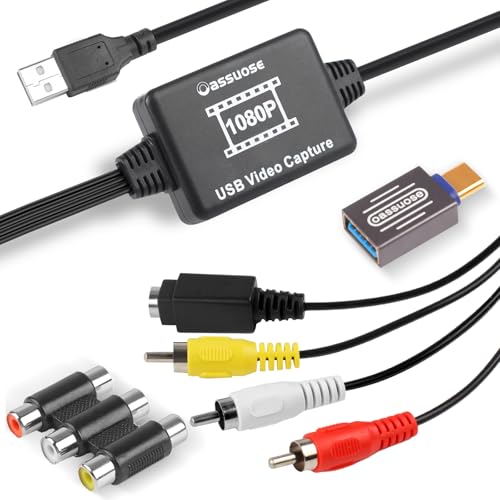
This USB-A/USB-C video capture device aims to transcode video and audio from VHS, VCR, DVD, Hi8, DV tapes, and camcorders to a computer in 1080P/30fps via USB-A or USB-C. It claims plug-and-play operation with no driver installation required, though it notes that acquisition software is needed for use. It supports both RCA and S-Video inputs, enabling synchronized audio-video capture for a straightforward digitization workflow. It’s suitable for users who want a direct analog-to-digital path without heavy software steps.
Highlights include 1080P/30fps output, broad input compatibility, and a simple setup that targets home archivists. The need for acquisition software means you’ll want a compatible capture app on your PC or Mac, but the hardware itself is designed for quick, on-the-go digitization.
What to consider
Verify that your computer has compatible software for the included capture pathway. If you rely on Mac or Windows solutions, confirm driver absence is not a blocker for your preferred workflow. It’s best for those who want a compact, portable capture solution without a steep learning curve.
XMSJSIY RCA AV to USB C Converter

Designed as a one-channel AV to USB converter, the XMSJSIY device supports NTSC and PAL formats and provides input via RCA/S-Video to USB-C. It’s positioned as a flexible solution for transferring media from VHS, VCR, DVD players, and other analog sources to a Mac or PC with a straightforward plug-and-play design. The model emphasizes synchronized audio and video capture, broad compatibility, and a window for viewing or saving captures in formats suitable for sharing online or archiving locally.
Key aspects include compatibility with multiple video standards, no software installation required, and resizable video windows for on-screen preview. It suits users who want a simple, portable device to connect to newer USB-C laptops or tablets without needing a dedicated PCIe card or external power supply.
Flsazrx Capture Card — USB Video Grabber

This device emphasizes high performance with the ability to capture audio without an external sound card. It supports brightness, contrast, hue, and saturation adjustments, and it aims to speed up rendering for projects that may be shared on DVD, the web, or mobile devices. The USB 2.0 interface supports plug-and-play operation, making it suitable for quick digitization of analog sources to digital formats. It positions itself as a practical option for hobbyists and creators who want efficient workflows with minimal setup.
Considerations include the balance between capture quality and processing speed, the need for any accompanying software, and how you’ll store or transfer the resulting files. It’s a straightforward solution for those who prioritize ease of use in a compact USB-powered package.
Buying Guide: Key Purchase Considerations for Mobile Video Converters
- Input compatibility: Ensure the device supports your sources (RCA, S-Video, composite, or HDMI if needed) and the tapes you own (VHS, VHS-C, Hi8, DV, etc.).
- Output formats and resolution: Look for 720P or 1080P output with MP4 or AVI options. Check if the device requires additional software for editing or if it provides a direct USB/SD path.
- Power and portability: USB-powered units are easiest to use on the go; consider whether you need USB-C compatibility for newer laptops or tablets.
- Ease of use and setup: Plug-and-play design with minimal driver requirements is ideal for quick digitization, especially if you’re not a tech expert.
- Software compatibility: If a device requires software, verify it works with your operating system (Windows, macOS, or both) and whether OBS or QuickTime can complement the workflow.
- Storage options: Check if the device can save to USB drives or SD cards directly, or if it requires a PC/Mac to store footage.
- Audio handling: Ensure the capture path preserves original audio quality and supports synchronization with video.
- Future-proofing: Consider devices that support multiple input types or can be used with a range of devices (laptops, desktops, or mobile adapters) to extend their usefulness.
When selecting a mobile video converter, align your choice with how you plan to digitize—whether you need a compact, plug-and-play unit for quick captures or a device that offers broader input support and more detailed control over video and audio signals. For archiving family memories, a solution with easy setup, dependable USB connectivity, and compatibility with your computer’s software will typically provide the best long-term value.