Choosing the right wireless mouse for your Mac can significantly enhance your productivity and comfort, whether you’re working on a MacBook, iMac, or iPad. Compatible with macOS and designed for seamless Bluetooth connectivity, these mice offer features like quiet clicking, adjustable DPI, and multi-device support. Below is a summary of the top options to consider for your Mac setup.
| Product | Brand | Key Features |
|---|---|---|
| Bluetooth Wireless Mouse for Mac | PEIBO | Dual-mode Bluetooth 5.2 & 2.4G, 3 DPI levels, auto sleep mode |
| Logitech M240 Silent Bluetooth Mouse | Logitech | Silent clicks, 18-month battery, compact & portable |
| Apple Magic Mouse | Apple | Multi-Touch surface, rechargeable, optimized glide design |
| RAPIQUE Bluetooth Wireless Mouse | RAPIQUE | Quiet click, slim design, quiet scrolling, dual mode |
| Logitech M196 Bluetooth Wireless Mouse | Logitech | Ambidextrous, portable, smooth tracking on many surfaces |
Bluetooth Wireless Mouse for Mac – PEIBO

This dual-mode wireless mouse from PEIBO supports Bluetooth 5.2, Bluetooth 3.0, and a 2.4GHz USB receiver, making it highly versatile for Mac users and other devices including iPads and Windows laptops. It offers plug-and-play convenience with support for macOS, iPadOS, Chrome OS, Linux, and more.
The mouse features three adjustable DPI levels (800, 1200, 1600), allowing you to tailor cursor sensitivity to your workflow, whether you’re working in a precise office environment or casual browsing. The rechargeable lithium-polymer battery ensures energy saving with an automatic sleep mode that activates after eight minutes of inactivity. This mouse is ideal for users seeking a reliable, multi-device option with excellent battery life and customizable precision.
Logitech M240 Silent Bluetooth Mouse
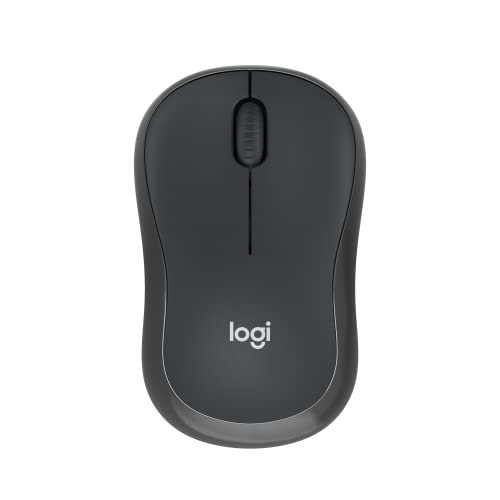
The Logitech M240 is designed with silent clicks that reduce noise by up to 90%, which is perfect for quiet office settings or shared spaces. It connects easily via Bluetooth without requiring a dongle.
With a compact and portable design, the M240 offers an 18-month battery life supported by an energy-efficient sleep mode. It is compatible with macOS as well as Windows and Chrome OS, making it a versatile choice for Mac users who value quiet operation and hassle-free setup in a minimalist form factor.
Apple Magic Mouse with Multi-Touch Surface

The Apple Magic Mouse is tailored specifically for Mac users, offering a smooth glide and a multi-touch surface enabling gestures like swiping and scrolling. Its wireless and rechargeable design integrates seamlessly with macOS, providing intuitive interactions.
The long-lasting internal battery powers the mouse for roughly a month between charges, paired with an optimized foot design for consistent movement. If you prioritize gesture support and a native macOS experience, this is a premium choice aligned with Apple’s ecosystem.
RAPIQUE Bluetooth Wireless Mouse
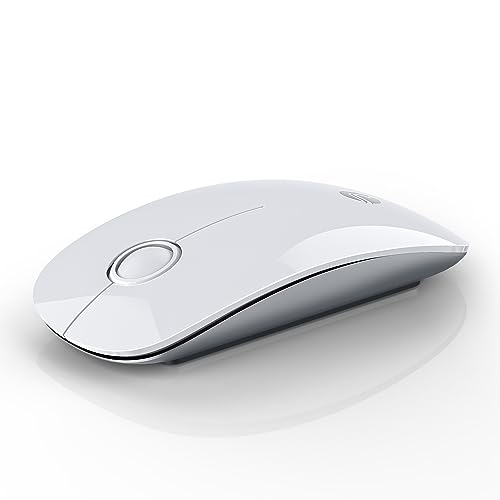
The RAPIQUE R306 is a slim, stylish Bluetooth mouse that emphasizes quiet clicks—reducing noise by over 90%—making it excellent for office or home use without distractions. It provides a comfortable grip with a unique circular wheel design and supports vertical scrolling. However, horizontal scroll functionality is not available.
This mouse is also lightweight and portable with a range of color options to suit different aesthetics. Its quiet operation paired with dual connection modes suits MacBook and iPad users seeking a minimalist yet functional wireless mouse.
Logitech M196 Bluetooth Wireless Mouse
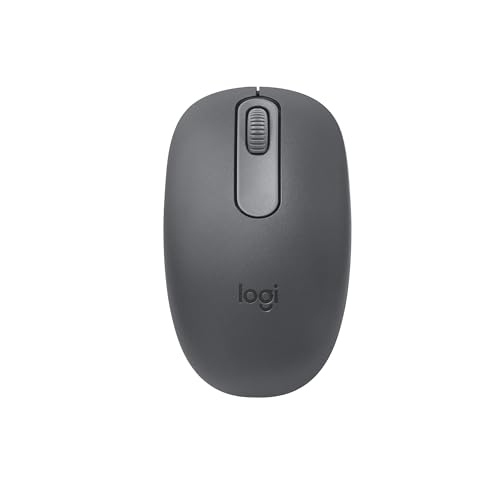
The Logitech M196 is a highly portable Bluetooth mouse featuring an ambidextrous design suitable for both right- and left-handed users. It pairs quickly with MacBooks and tablets without requiring extra adapters or dongles.
Its optical tracking technology ensures smooth and precise cursor control on most surfaces, making it a reliable companion for mobile professionals who frequently switch work environments. The lightweight design fits easily in bags and pockets for comfortable travel use.
Buying Guide for Mac-Compatible Wireless Mice
When selecting a wireless mouse for a Mac or Apple device, it is important to consider several key factors that influence functionality and user experience.
Compatibility and Connectivity
- Bluetooth Support: Ensure the mouse supports Bluetooth versions compatible with your Mac, typically Bluetooth 4.0 or higher for reliable connections.
- Multi-Device Functionality: Some mice, like those with dual-mode Bluetooth and 2.4G connectivity, offer flexibility across MacBooks, iPads, and other devices.
- Plug-and-Play: Compatibility with macOS without requiring drivers or dongles simplifies setup and use.
Ergonomics and Design
- Comfort: Look for mice with shapes that fit your hand size and grip style to prevent fatigue during long use.
- Portability: Slim and lightweight designs are ideal for travelers and users who move between workspaces.
- Scroll Wheel and Buttons: Consider if you need horizontal scrolling or additional programmable buttons for advanced workflows.
Performance Features
- DPI Adjustability: Adjustable DPI settings allow customizing cursor speed for tasks ranging from precise design to casual browsing.
- Tracking Accuracy: Optical or laser sensors optimized for any surface, including glass, enhance productivity.
- Click Noise: Silent or quiet click mice help maintain a distraction-free environment.
Battery Life and Power
- Rechargeable vs. Replaceable Batteries: Rechargeable mice reduce waste and offer convenience but check charge duration and charging methods.
- Energy Saving: Auto sleep modes or power-saving features prolong battery life and reduce maintenance.
By evaluating these factors based on your usage preferences, you can find a Mac-compatible wireless mouse that enhances your workflow and comfort with reliable connectivity and tailored features.