For creative professionals and video editors, mastering Adobe After Effects shortcuts is crucial for efficient workflow. Having a keyboard cover or sticker designed specifically for After Effects can significantly speed up your editing process. Below is a summary table showcasing top-rated After Effects shortcut keyboard covers for MacBooks, featuring durable materials, precise fit, and thoughtful designs tailored to various MacBook models and Touch Bar versions.
| Product | Brand | Key Features |
|---|---|---|
| Synerlogic After Effects Shortcut Sticker | Synerlogic | Military-grade vinyl, no-residue, quick reference for essential shortcuts |
| HRH Silicone Keyboard Cover for MacBook Pro 13/15 inch | HRH | Premium silicone, ultra-thin 0.3mm, fits Touch Bar models 2016-2019 |
| JCPal Shortcut Guide Keyboard Cover M1-M4 MacBooks | JCPal | Vivid printed design, 80+ shortcuts, washable silicone |
| HRH Hotkey Silicone Cover for 2020 M1 MacBook Pro 13 inch and 2019 16 inch | HRH | Washable, spill-resistant, engineering-grade silicone |
| XSKN Adobe After Effects Shortcut Keyboard Skin for Touch Bar MacBook Pro | XSKN | Durable heat-fused paint, crack-proof, washable, US/EU layouts |
Synerlogic Adobe After Effects Shortcut Keyboard Sticker
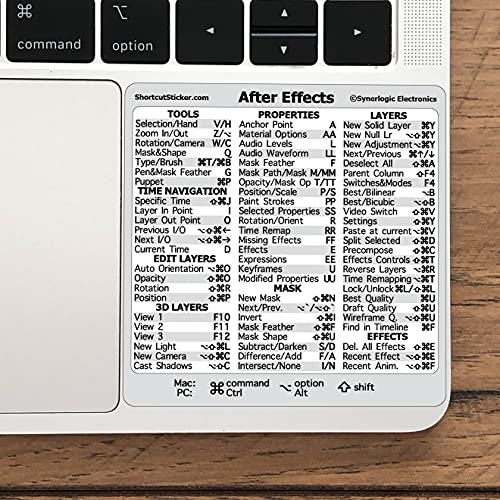
The Synerlogic Shortcut Keyboard Sticker offers an easy reference to every essential shortcut in Adobe After Effects. Crafted from military-grade durable laminated vinyl, it leaves no residue when removed and mimics an OEM keyboard appearance. This sticker is a perfect tool for speeding up workflow, helping users learn and quickly lookup commands without internet searches. It suits any MacBook or Windows PC and is ideal for all skill levels ranging from students to professionals.
HRH After Effects Silicone Keyboard Cover for MacBook Pro 13/15 inch

This HRH keyboard cover is made from premium engineering grade silicone that is ultra-thin (0.3mm), ensuring typing remains comfortable without damaging your screen. It provides dedicated After Effects shortcut hotkeys printed directly onto the cover. Compatible with MacBook Pro 13″ and 15″ Touch Bar models from 2016 through 2019 releases. This skin enhances productivity by allowing quick shortcut access while protecting the keyboard against spills and dust.
JCPal Adobe After Effects Shortcut Guide Cover for Latest MacBooks

Designed for Apple MacBook Pro (14″/16″) and MacBook Air (13″/15″) M1 to M4 models, the JCPal keyboard cover features a vivid screen-printed design with over 80 essential After Effects shortcuts. It improves muscle memory by displaying two shortcuts per key with color coding and icons. Made from ultra-thin silicone (0.3mm), it protects against dust and liquid spills and is washable without losing fit or quality.
HRH After Effects Hotkey Cover for M1 MacBook Pro 13 inch and 16 inch
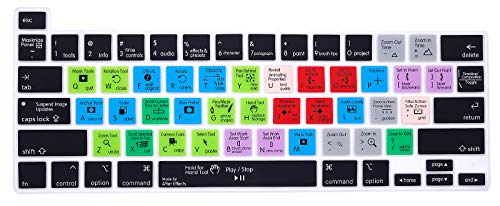
This HRH silicone cover is tailored to enhance After Effects workflow for users unfamiliar with hotkeys. The material is premium durable, non-toxic silicone and remains ultra-thin, so typing feels natural. It is removable and washable, preserving cleanliness and durability while providing protection against spills and debris. Compatible with MacBook Pro 13″ M1 (Model A2289/A2251/A2338) and 16″ 2019 (Model A2141) Touch Bar models, it’s a practical choice for professionals.
XSKN After Effects Shortcut Keyboard Skin for Touch Bar MacBook Pro

The XSKN keyboard skin offers durability and style with shortcut designs molded from silicone and hand screen printed with heat-fused paint to ensure longevity and crack resistance. It fits US and European layouts for MacBook Pro 13″ and 15″ Touch Bar models. Its soft, ultra-thin, and washable nature helps you learn shortcuts daily while protecting your keyboard from spills, crumbs, and dust.
Buying Guide for MacBook Keyboard Covers Designed for After Effects
Choosing the right keyboard cover or sticker for Adobe After Effects depends on several factors:
- Compatibility: Ensure the cover fits your specific MacBook model, especially regarding screen size and whether it includes a Touch Bar. Models from different years vary in layout and key spacing.
- Material Quality: Silicone covers provide protection and durability; look for non-toxic, premium-grade silicone that is ultra-thin for comfortable typing. Vinyl stickers should be residue-free and long-lasting without wear.
- Shortcut Coverage: Some covers show basic shortcuts, while others include over 80 shortcuts with color coding for better muscle memory. Choose according to your skill level and shortcut familiarity.
- Protection Features: Covers that protect against liquid spills, dust, and crumbs help maintain your MacBook’s longevity, especially in busy editing environments.
- Washability and Maintenance: Products that are washable or easy to clean offer hygienic benefits, particularly for long-term use.
- Layout Options: Confirm if the product supports your keyboard layout, such as US or European ISO. Layout compatibility is crucial for accurate key mapping.
- Design and Aesthetic: Some users prefer subtle designs that blend with their MacBook’s look, while others like brightly colored or vivid prints for quick recognition.
By considering these factors and selecting from reliable brands like HRH, JCPal, Synerlogic, and XSKN, you can enhance your Adobe After Effects workflow with a dedicated shortcut keyboard cover tailored for MacBooks.