If you’re searching for the best Mac keyboard and mouse combos tailored to enhance your Apple device productivity, this guide covers top options perfect for MacBook Pro, MacBook Air, iMac, iPad, and more. From backlit keys and multi-device connectivity to ergonomic designs and quiet typing, these combos optimize comfort and efficiency. Below is a summary table of the top-rated combos highlighted in this article for quick reference.
| Product | Brand | Key Features |
|---|---|---|
| seenda Bluetooth Keyboard and Mouse for Mac | seenda | Multi-device, rechargeable Type-C, silent typing/clicking |
| ProtoArc Backlit Keyboard and Mouse for Mac | ProtoArc | Backlit keys, connect 3 devices via Bluetooth, Mac optimized |
| Logitech MK955 Signature Slim Wireless Combo | Logitech | Multi-OS, customizable keys, silent full-size layout |
| Logitech MX Keys S Combo for Mac | Logitech | Mac-specific layout, backlit, USB-C charging, ergonomic design |
| Logitech Pebble 2 Combo for Mac | Logitech | Slim, portable, easy-switch Bluetooth, recycled plastic build |
seenda Bluetooth Keyboard and Mouse for Mac

The seenda Bluetooth Keyboard and Mouse combo is designed with Apple users in mind, featuring a standard Apple layout that integrates seamlessly with MacBook Pro, MacBook Air, and iPad devices. This combo supports three advanced Bluetooth modes (BT1, BT2, BT3), allowing effortless typing across multiple devices.
This model boasts a Type-C rechargeable battery, supporting up to 200 hours of standby time, eliminating the hassle of frequent battery replacements. Its auto-sleep and on/off features contribute to energy efficiency. The typing and clicking experience is optimized with whisper-quiet keys that reduce noise while maintaining responsiveness, ideal for focused work environments.
ProtoArc Backlit Bluetooth Keyboard and Mouse for Mac

The ProtoArc KM100-A combo delivers a full-size wireless keyboard and mouse designed especially for macOS 10.12 and later. Featuring Bluetooth 5.1, it connects effortlessly to MacBooks, iPads, and iPhones. Users can connect up to three devices and switch between them instantly using the mode button, boosting productivity.
A standout feature is the soft white backlit keys with three adjustable brightness levels, perfect for typing in low-light conditions without eye strain. While optimized for Mac, it’s not fully compatible with Windows, especially regarding media and function keys, making it ideal for dedicated Apple users seeking enhanced usability.
Logitech MK955 Signature Slim Wireless Keyboard and Mouse Combo
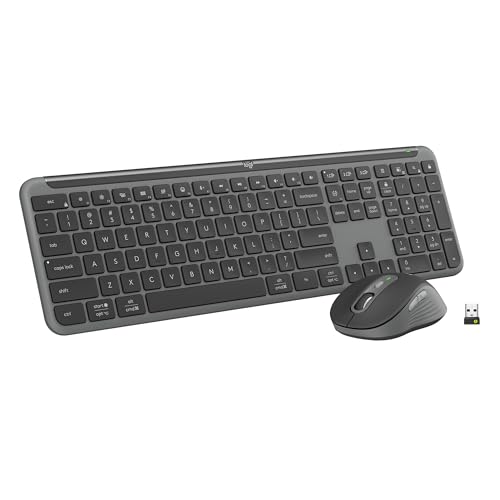
The Logitech MK955 combo is perfect for users who switch between personal and work computers, thanks to its ability to seamlessly switch typing and clicking across three devices. Its full-size slim keyboard offers a laptop-like typing experience, while the ergonomically contoured mouse provides comfort for larger hands.
This combo comes with the Logi Options+ app enabling customizable keys, buttons, and shortcuts across Windows and macOS. Its durable build includes recycled plastic materials, making it an environmentally-conscious choice for users looking for both style and functionality in a wireless setup.
Logitech MX Keys S Combo for Mac

The Logitech MX Keys S Combo is meticulously mastered for Mac with a dedicated Mac key layout and striking Space Gray finish to match Apple devices. It features a wireless Bluetooth connection with programmable functions accessible via the Logi Options+ software.
Its laptop-style keyboard includes spherically dished keys tailored to the fingertips, providing a fluid, precise, and comfortable typing experience. The wireless mouse includes fast scroll capabilities and USB-C charging, streamlining your workspace with efficient wireless technology.
Logitech Pebble 2 Combo for Mac

The Logitech Pebble 2 Combo stands out for its ultra-slim, portable, and quiet design, making it an excellent choice for users on the move. This combo cleverly allows connection to up to three Apple devices using Bluetooth with an easy-switch button for quick transitions across macOS, iPadOS, and iOS.
Manufactured using recycled plastic, this combo merges sustainability with functionality. Its compact size, along with the slim keyboard and mouse, makes it suitable for small workspaces or travel. The design emphasizes comfort and silent usage without compromising style.
Buying Guide: Key Factors When Choosing Mac Keyboard and Mouse Combos
Compatibility and Layout
Ensure the keyboard and mouse are explicitly designed or fully compatible with Mac operating systems and Apple device layouts. Mac-specific keys and shortcuts significantly improve productivity and minimize adjustment time.
Multi-Device Connectivity
For professionals juggling several devices, opt for combos with Bluetooth multi-device pairing, allowing easy switching between MacBooks, iPads, and other Apple gadgets without reconnecting constantly.
Battery Life and Charging
Rechargeable combos with USB-C charging provide convenience and cost savings over time. Look for devices offering long battery life and power-saving features such as auto-sleep modes to maximize usage.
Typing Experience and Noise Level
Comfortable key travel, stable keycaps, and low noise during typing and clicking make for a better user experience. Silent or whisper-quiet keys are preferred in professional or shared workspaces.
Ergonomics and Design
Consider the size and shape of the keyboard and mouse relative to your workspace and ergonomic needs. Options like contoured mice and compact, angled keyboards can reduce strain during extended use.
Backlit Keys
Backlit keyboards with adjustable brightness enhance visibility in dim environments, aiding accuracy without causing eye fatigue.
Customization and Software Support
Combos that offer programmable keys and accompanying software give users the ability to tailor their experience, customizing shortcuts and functions to optimize efficiency.
Choosing the ideal Mac keyboard and mouse combo ultimately depends on your workflow, preferences for connectivity, comfort, and style consistency with your Apple setup.