Finding the best left handed mouse tailored to your ergonomic needs can significantly improve comfort and efficiency during computer use. This guide covers top options designed specifically for left-handed users, focusing on wireless connectivity, ergonomic design, customizable features, and compatibility with popular operating systems. Below is a summary table highlighting the key features of the selected left handed mice.
| Product | Brand | Connectivity | Ergonomic Type | Buttons | Compatibility |
|---|---|---|---|---|---|
| Logitech Lift Vertical Ergonomic Mouse | Logitech | Wireless Bluetooth / USB Receiver | Vertical | 4 | Windows, macOS, iPadOS |
| Logitech Wireless Mouse Signature M650 L | Logitech | Bluetooth / USB Receiver | Full Size | Customizable | PC, Mac, Chromebook |
| MEETION Left-Handed Vertical Mouse | MEETION | Bluetooth 5.2 + 3.0, USB-A Wireless | Vertical | Standard | Windows, Mac, Linux |
| ELECOM EX-G Left Handed Trackball Mouse | ELECOM | 2.4 GHz USB Wireless | Trackball | 6 Programmable | Windows |
| Lekvey Wireless Lefty Vertical Mouse | Lekvey | 2.4 GHz USB Wireless | Vertical | 6 | Windows (not Mac) |
Logitech Lift Vertical Ergonomic Mouse
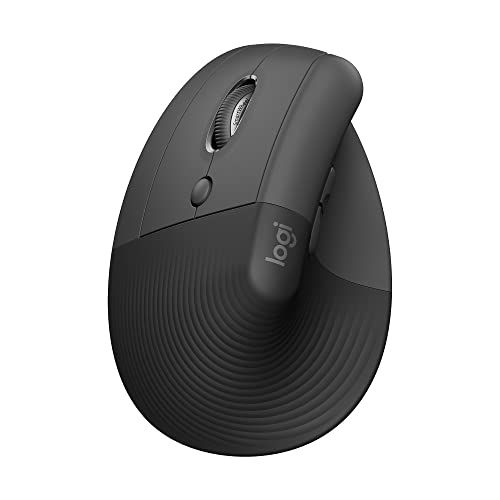
The Logitech Lift Vertical Ergonomic Mouse is designed specifically for small to medium left hands, offering a comfortable and natural posture. Its vertical design promotes a 57-degree ergonomic angle that reduces forearm strain and wrist pressure throughout long work sessions. The soft textured grip and snug thumb rest provide extra coziness. Connectivity options include wireless Bluetooth and USB receiver, compatible with Windows, macOS, and iPadOS. This mouse features quiet clicks and four buttons to enhance productivity without being distracting.
Logitech Wireless Mouse Signature M650 L Left-Handed
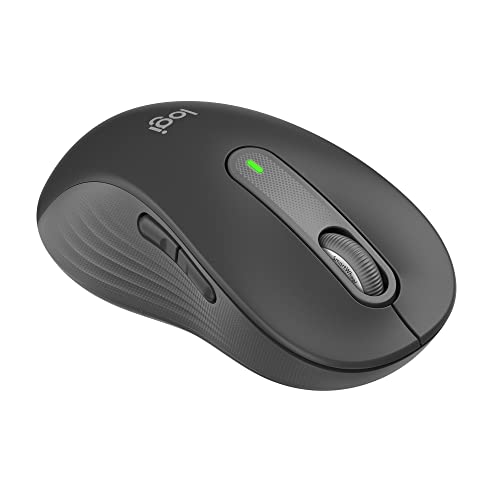
The Logitech Signature M650 L is a full-sized wireless mouse crafted for users with larger left hands. This mouse supports both Bluetooth Low Energy and Logi Bolt USB receiver connections, allowing easy integration with PC, Mac, and Chromebook devices. It features customizable side buttons through Logitech Options+ software, enabling quick access to shortcuts like back/forward or copy/paste. The SmartWheel scroll function switches between precise line-by-line movement and rapid scrolling, improving navigation over long documents or web pages.
MEETION Left-Handed Ergonomic Vertical Mouse

The MEETION Left-Handed Vertical Mouse stands out with its unique vertical grip designed to ease wrist and forearm strain, thereby promoting a healthier posture. It offers a versatile connectivity suite including Bluetooth 5.0 and 3.0, plus 2.4G wireless via USB with a Type-C adapter, making it compatible across Windows, Mac, and Linux operatings systems. This mouse includes RGB lighting with customizable effects and a rechargeable battery, eliminating the need for disposable batteries.
ELECOM EX-G Left Handed Trackball Mouse

The ELECOM EX-G is perfect for left-handed users seeking a precise trackball mouse that reduces hand movement. It uses optical tracking technology for accurate cursor control and features six programmable buttons customizable through ELECOM Mouse Assistant software. The DPI can be toggled between 750 and 1500 for speed adjustment. Its 2.4 GHz wireless USB connection offers efficient productivity with less wrist strain, catering especially well to users who prefer trackball designs.
Lekvey Wireless Left Hand Ergonomic Vertical Mouse

The Lekvey Left Handed Vertical Mouse is designed to promote a neutral “handshake” wrist position, recommended for users with repetitive strain injuries or those working long hours. It connects via a 2.4 GHz wireless nano USB receiver with plug-and-play ease. The mouse includes six buttons including advanced page navigation and offers three DPI levels (800/1200/1600) for precise control suitable for gaming and regular use. Note that this model is not compatible with Mac OS.
Buying Guide For Choosing The Best Left Handed Mouse
Selecting the ideal left handed mouse involves multiple factors that can greatly affect comfort, performance, and compatibility. Here are key considerations when choosing:
Ergonomic Design
Ergonomic shapes like vertical mice help maintain a natural wrist angle and reduce strain during long computer sessions. Trackball models offer minimal hand movement but require some adaptation. Assess your comfort preferences and any existing wrist issues.
Connectivity Options
Wireless mice typically connect via Bluetooth or a 2.4 GHz USB receiver. Bluetooth offers device versatility but may have slight latency, while USB receivers provide stable connections. Some models support both, increasing multi-device compatibility.
Button Customization
Programmable buttons can speed up workflow by assigning shortcuts such as back, forward, copy, or paste. Software support from the manufacturer enables customization to tailor the mouse functions to your specific needs.
DPI Settings
DPI (dots per inch) controls cursor sensitivity. Adjustable DPI levels let you switch between precision for detailed tasks and speed for general browsing or gaming. Look for mice with easy DPI toggling.
Size and Fit
Consider hand size — small, medium, or large — to ensure that the mouse fits comfortably. An ill-fitting mouse can cause discomfort or hinder productivity.
Operating System Compatibility
Ensure the mouse supports your devices’ OS, such as Windows, macOS, Linux, or iPadOS. Some models may exclude Mac compatibility, so verify before purchasing.
Battery and Power
Rechargeable mice save on disposable batteries and are environmentally friendly. Check for battery life and charging options that suit your usage patterns.
By evaluating these aspects, you can choose a left handed mouse that elevates your ergonomic comfort and productivity based on your personal preferences and technical requirements.