Architecture students require laptops that combine strong processing power, ample memory, and vivid displays to support demanding software like CAD and 3D modeling programs. Below is a concise summary table featuring five top laptops selected for their suitability in handling architecture coursework and design projects efficiently.
| Product | Processor | RAM | Storage | Display |
|---|---|---|---|---|
| HP Touchscreen Laptop 14″ | Intel Celeron N4500 (up to 2.80 GHz) | 16GB DDR4 | 512GB PCIe NVMe SSD | 14″ HD Touchscreen (1366×768) |
| ACEMAGIC 18.5″ Laptop | Intel N150 Quad-Core (up to 3.6 GHz) | 16GB DDR4 | 512GB SSD | 18.5” Full HD IPS (1920×1080) |
| MALLRACE 15.6″ Laptop | Intel N150 12th Gen Quad-Core (up to 3.6 GHz) | 16GB DDR4 | 512GB SSD (expandable) | 15.6” Full HD IPS |
| NIMO 15.6″ FHD Laptop Rose Gold | Intel Alder Lake-N100 12th Gen Quad-Core (up to 3.4 GHz) | 16GB RAM | 1TB SSD | 15.6″ FHD Anti-glare (1920×1080) |
| HP 14″ Student Laptop with WiFi 6 | Intel Quad-Core (up to 3.6 GHz) | 16GB DDR4 | 64GB UFS + 256GB Ghost Manta SD Card | 14″ HD BrightView (1366×768) |
HP Touchscreen Laptop for Architecture Students
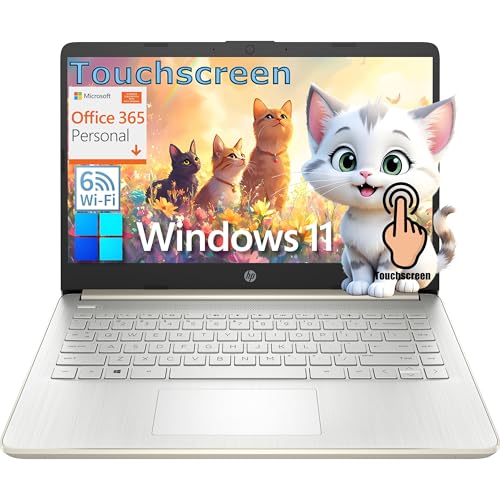
This HP 14-inch touchscreen laptop offers a balance of portability and multitasking ability with its Intel Celeron N4500 processor that can boost up to 2.80 GHz. With 16GB DDR4 RAM, users can run multiple architecture design and drafting applications efficiently. The 512GB PCIe NVMe SSD boasts fast data access, critical when handling large CAD files or creative software. The anti-glare touchscreen enhances workflow by allowing intuitive navigation, especially useful for design sketching and presentations. This model also integrates WiFi 6 and USB-C for swift data transfers and connectivity during group projects or remote learning, making it a practical choice for architecture students.
ACEMAGIC 18.5″ Large Screen Laptop for Detailed Work

The ACEMAGIC laptop features an impressively large 18.5-inch Full HD IPS display which delivers excellent color accuracy and detail sharpness. Running on an Intel N150 quad-core processor paired with 16GB DDR4 RAM, this laptop manages multitasking and complex software without lag. The 8000 mAh battery ensures extended use for lengthy studio sessions. Multiple connectivity options including Type-C and webcam support make it versatile for both research and virtual collaboration. Its size and high resolution are particularly well-suited to the precision work needed for architectural modeling and digital drafting.
MALLRACE 15.6″ FHD Laptop With Expandable Storage

The MALLRACE notebook features a 15.6-inch Full HD IPS display, delivering crisp visuals vital for architectural drafting. Powered by a 12th generation N150 Intel quad-core processor and 16GB DDR4 RAM, it achieves swift data processing and smooth multitasking. Its 512GB M.2 SSD storage supports expansion up to 2TB, providing flexibility for large project files. Equipped with several ports including HDMI and USB 3.2, plus Bluetooth 5.0 and WiFi 5, it facilitates seamless peripheral connections and stable internet access for cloud-based design software.
NIMO 15.6″ FHD Laptop With Backlit Keyboard

The NIMO laptop provides an excellent combination of performance and style, featuring a 15.6-inch FHD anti-glare display that minimizes eye strain during long study sessions. Powered by the Intel Alder Lake-N100 12th Gen quad-core processor and equipped with 16GB RAM and 1TB SSD, it delivers smooth multitasking and fast file handling. Additional features include a backlit keyboard beneficial for low-light environments and a fingerprint sensor enhancing device security. With a two-year warranty, it ensures durability and reliable support for architectural students.
HP 14″ Student Laptop With WiFi 6 and Copilot AI

This HP 14-inch laptop is designed for productivity with an Intel quad-core processor and 16GB DDR4 RAM to support multitasking with ease. Storage is split between 64GB UFS and an additional 256GB Ghost Manta SD card, offering a good mix of fast access and expandable space. Its HD BrightView 14-inch display has ultra-thin bezels providing a wide field of view, while integrated Copilot AI assists students by streamlining tasks and improving workflow. WiFi 6 technology ensures stable high-speed connectivity essential for cloud-based design resources and collaboration.
Buying Guide for Laptops Suitable for Architecture Students
Processor Performance
Architecture software such as AutoCAD, Revit, and 3D rendering programs require a robust multi-core processor. Look for at least an Intel Quad-Core or equivalent AMD Ryzen processor with clock speeds higher than 2.5 GHz. Newer generation processors will handle multitasking and complex computations faster, benefiting visualization and modeling tasks.
Memory (RAM)
A minimum of 16GB DDR4 RAM is essential for smooth multitasking and running resource-heavy architecture applications. RAM capacity impacts your ability to work with large files and multiple applications simultaneously without system slowdowns.
Storage Type and Capacity
Fast storage is key. Opt for SSD drives rather than HDDs, offering rapid boot and load times for large CAD files. At least 512GB storage is recommended, with options for expansion or hybrid storage solutions useful for managing extensive design portfolios.
Display Quality and Size
A high-resolution Full HD (1920×1080) IPS display improves clarity, color accuracy, and viewing angles—important for detailed design work. Screen sizes around 15 to 16 inches balance portability with a comfortable workspace. Anti-glare and touchscreen options can enhance ease of use and reduce eye strain.
Connectivity and Ports
Ensure the laptop offers multiple USB ports, HDMI, and preferably USB-C for connecting external devices like drawing tablets, monitors, and projectors. WiFi 6 support improves wireless network stability, helpful in campus environments or remote collaboration.
Battery Life and Portability
Consider how long you need to work unplugged. Architecture laptops with battery lives around 8-11 hours help students attend classes and work on projects throughout the day. Lightweight models improve portability between studios, libraries, and classrooms.
Additional Features
Features like backlit keyboards aid in low-light conditions commonly encountered during late-night work sessions. Some models offer specialized software assistive features such as AI-powered workflow tools that speed up tasks. Warranty and manufacturer support also add peace of mind.