Finding the best laptop to edit videos involves considering powerful processors, ample memory, quality displays, and reliable connectivity. This article highlights top laptops suited for video editing along with essential video capture and wireless streaming devices to enhance your editing setup. Below is a summary table of the selected products, focusing on key attributes useful for video editing and content production workflows.
| Product | Brand | Main Features | Link |
|---|---|---|---|
| HP 2025 New 14 Inch Laptop | HP | Intel N150 CPU, 16GB RAM, 384GB Storage, Wi-Fi 6, Windows 11 Pro | Buy on Amazon |
| AOC 2025 AX15 15.6-inch Laptop | AOC | N97 Processor up to 3.6GHz, 16GB RAM, 512GB SSD, Windows 11 | Buy on Amazon |
| Capture Card USB Video Converter | VIXLW | AV to USB converter, 720P HD output, Plug & Play for VHS/VCR digitizing | Buy on Amazon |
| VHS to Digital RCA to USB Converter | DigitPro | Supports multiple video formats, USB 2.0, plug & play, real-time performance | Buy on Amazon |
| Wireless HDMI Transmitter & Receiver Kit | YUYUNLOMN | 165FT range, 1080P@60Hz, dual antenna, plug-and-play, 2.4/5GHz bands | Buy on Amazon |
HP 2025 New 14 Inch Laptop for Video Editing

The HP 2025 14-inch laptop is equipped with an Intel N150 processor featuring 4 cores and 4 threads, delivering speeds up to 3.60 GHz. This processing power supports smooth multitasking and video editing workflows for beginners and intermediate editors. It includes 16GB DDR4 RAM, enabling efficient handling of editing software and multiple applications simultaneously without lag.
The 14-inch HD Anti-glare display provides crisp visuals with 250 nits brightness, ideal for reviewing footage. Combined with Intel graphics, users experience vivid colors essential for color grading. Storage is thoughtfully split between 128GB UFS and an additional 256GB microSD card, allowing flexible file management. The included Windows 11 Pro and Microsoft 365 subscription streamline productivity and creative tasks.
AOC 2025 AX15 15.6-Inch Laptop for Creative Work
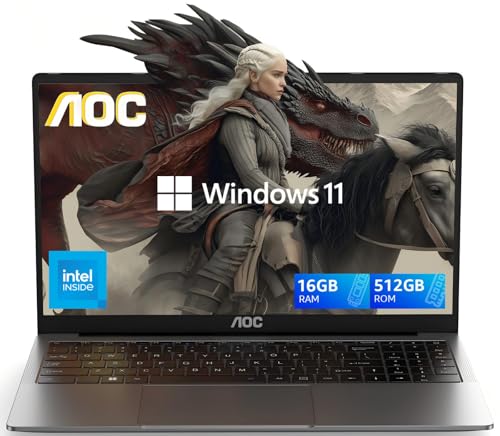
The AOC 2025 AX15 is powered by a robust N97 processor, reaching up to 3.6GHz turbo frequency to support demanding video editing and multitasking without sacrifice. The laptop boasts 16GB DDR4 RAM for smooth workflow and a fast 512GB M.2 SSD offering rapid read/write for large video files and fast software loading times.
This laptop features a 15.6-inch Full HD display for clear, detailed visuals necessary during editing and preview. Its metal shell design adds durability while maintaining lightweight portability. Rich connectivity includes USB 3.2 Gen1 ports, Type-C ports, HDMI, and TF card support, facilitating connection to monitors and external drives frequently used in editing setups. Windows 11 ensures compatibility with popular video editing software programs.
VIXLW USB Video Capture Card for Analog to Digital Conversion

The VIXLW USB capture card is designed to convert analog RCA composite video signals into HD 720P USB outputs. Perfect for videographers digitizing old VHS, Hi8, or VCR tapes, it captures both audio and video with advanced signal processing for accurate colors and resolutions.
This unit supports plug-and-play functionality with automatic driver installation and requires no external power supply. It is compatible with Windows and Mac systems, making it an accessible tool for content creators who need to integrate legacy footage into digital editing projects.
DigitPro VHS to Digital RCA to USB Video Converter

The DigitPro USB 2.0 video capture adapter provides versatile support for multiple video formats including DVD and VHS tapes via RCA or S-Video input. It allows users to capture both audio and video without requiring a sound card, aiding in restoring archival footage.
The device is plug-and-play, easy to operate, and compatible with PC and Mac platforms. Real-time video processing and controls for brightness, contrast, hue, and saturation enable fine tuning before conversion, essential for preparing footage for editing software.
YUYUNLOMN Wireless HDMI Transmitter and Receiver

The YUYUNLOMN Wireless HDMI kit supports 1080P at 60Hz video streaming with a wireless transmission range up to 165 feet in open spaces. This device facilitates cable-free media transmission from laptops and other HDMI sources to monitors or TVs, ideal for previewing edits or presentations in real time on larger displays without latency.
Operating on both 2.4GHz and 5.8GHz frequency bands, it boasts a dual-antenna design for strong signal penetration and minimizes connection disruptions. The kit is factory-paired with a true plug-and-play experience, requiring no additional apps, Bluetooth, or Wi-Fi setup.
Buying Guide for Choosing the Best Laptop to Edit Videos
When selecting a laptop specifically for video editing, consider the following factors to optimize your workflow efficiency and editing quality:
Processor (CPU) Power
Video editing software tends to be CPU-intensive. Select a laptop that offers at least a quad-core processor with clock speeds around or above 3.0 GHz. Intel Core i5/i7 or AMD Ryzen 5/7 equivalents are commonly recommended for handling 1080p editing smoothly. The featured laptops include Intel N150 and N97 processors, which provide competent multitasking and editing capabilities for light to medium video projects.
Memory (RAM)
A minimum of 16GB RAM is advisable to ensure fluid timeline editing when using programs like Adobe Premiere Pro or DaVinci Resolve. More RAM allows editing complex multicam videos and project files without performance bottlenecks. Both HP and AOC laptops listed come equipped with 16GB DDR4 RAM, supporting seamless multitasking.
Storage Type and Size
Fast storage is critical for loading large video files. Solid State Drives (SSD) offer significantly faster read/write speeds than traditional hard drives. Larger capacity SSDs (like the 512GB on the AOC laptop) provide space for raw footage and project files, speeding up rendering and export times.
Display Quality
Look for full HD or higher resolution screens with good color accuracy and brightness to preview your edits accurately. Anti-glare screens help reduce eye strain during long editing sessions. The 14″ and 15.6″ panels on the selected laptops balance portability and viewing detail well.
Graphics Capability
Integrated graphics such as Intel’s latest UHD or Iris series can handle basic video editing tasks. However, external or dedicated GPUs improve rendering speed and effects processing. The laptops featured include integrated Intel graphics sufficient for 1080p and moderate editing workflows.
Additional Video Capture and Streaming Tools
To complement your editing laptop, video capture devices like USB video capture cards allow digitizing analog footage directly into your editing software. Wireless HDMI transmitters facilitate cable-free previews on external monitors during editing or presentations. Devices from VIXLW and YUYUNLOMN expand your content production versatility.
Connectivity and Ports
Sufficient USB ports (including USB-C or USB 3.2) and HDMI outputs enable connection to hard drives, cameras, and external displays. This is vital for transferring footage quickly and evaluating edits on larger screens or color calibration monitors.
By balancing processor speed, memory, storage, and display quality along with essential connectivity features, you can select a laptop equipped to streamline your video editing process and integrate well with supporting devices for capturing and streaming content.