Choosing the best keyboard for Xbox can elevate your gaming experience by making chats and commands faster and easier. In this guide, we review the top 5 Xbox-compatible keyboards that offer wireless connectivity, RGB backlighting, and sound jack integration to enhance gameplay. These keyboards cater to different Xbox models like Xbox One, Series X/S, and Elite, ensuring compatibility and seamless use.
| Keyboard | Brand | Key Features | Compatibility |
|---|---|---|---|
| MoKo Green Backlight Chatpad | MoKo | Wireless 2.4G, Green backlight, 3.5mm audio jack | Xbox One, Xbox One S, Elite, Series X/S (not One X) |
| TiMOVO Green Backlight Keyboard | TiMOVO | 47 keys full keyboard, 2.4G wireless, detachable receiver | Xbox One Series, Elite series, Series X/S (not One X) |
| MoKo RGB Backlight Gaming Keyboard | MoKo | RGB backlight modes, detachable 2.4G receiver | Xbox One/One S, Series X/S, Elite |
| Auarte Wireless Chatpad Keypad | Auarte | Wireless, 3.5mm audio jack, full QWERTY 47 keys | Xbox Series X/S, One X/S, Elite One/2 |
| 8BitDo Retro 87 Mechanical Keyboard | 8BitDo | RGB backlight, Bluetooth/2.4G/USB-C, Xbox button | Windows 10+ & Android 9+ (not Xbox consoles) |
MoKo Green Backlight Keyboard for Xbox Controller

The MoKo Green Backlight Keyboard is thoughtfully designed to be compatible with Windows 10, Xbox One controller models including the One S, Elite, Elite 2, Xbox Series X, and S controllers. Note that it is not compatible with Xbox One X. This wireless chatpad connects seamlessly via the controller and features a bright green backlight activated by pressing “Shift+Space” or the “Xbox” button. The backlight enters a power-saving mode after 10 seconds of inactivity to conserve battery.
Additionally, it supports 2.4G wireless communication using the USB receiver and includes a 3.5mm audio jack for headset connectivity, perfect for group chat while gaming. The firm buttons provide tactile feedback for accurate typing during messaging and code entry, making communication fast and effortless during multiplayer sessions.
TiMOVO Green Backlight Keyboard for Xbox One
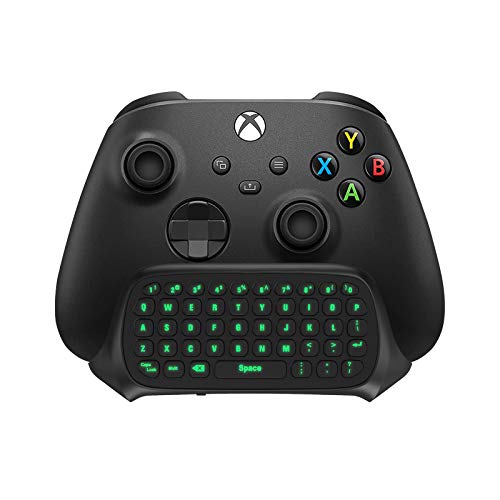
The TiMOVO Green Backlight Keyboard is another great option designed to support a broad range of Xbox controllers from Xbox One to Series X/S and Elite variants, excluding Xbox One X. It features a full 47-key layout, which includes letters, numbers, and essential function keys for easier and quicker typing during game chats and messaging.
This keyboard comes with a bright green backlight that activates when pressing the “Xbox” button and intelligently powers down after 10 seconds of no activity. The wireless connection uses a 2.4G receiver located at the top right of the keyboard, which is detachable for convenience. This makes it portable and easy to store, ensuring reliable data transmission for smooth performance while gaming.
MoKo RGB Backlight Keyboard for Xbox Series X/S

The MoKo RGB Backlight Keyboard upgrades the Xbox chatpad with an attractive RGB lighting system featuring three customizable modes: rainbow breathing, trichrome, and monochrome. This keyboard fits Xbox One, One S, Series X/S, and Elite controllers (excluding One X) and offers a compact design that maintains controller aesthetics and a comfortable grip.
Equipped with a stable 2.4G wireless connection and a detachable receiver housed in the keyboard’s top-right corner, this chatpad ensures a connection range up to 10 meters. The silicone keys are specially designed for clear letter recognition in dim gaming environments. The RGB backlight automatically switches off after 10 seconds of inactivity to save power but restores the previous mode when reactivated.
Auarte Wireless Chatpad Gaming Keyboard for Xbox

The Auarte Wireless Chatpad is compatible with Xbox Series X/S, Xbox One in its various models including One X and Elite versions. This mini full-QWERTY keypad offers 47 keys with number and letter keys, along with some function keys to rapidly send messages or codes. It has a built-in 3.5mm headphone jack and speaker support for voice chat capabilities during gameplay.
The keyboard uses a wireless connection with a USB receiver that conveniently stores inside the controller when not in use. This design emphasizes portability and ease of use while supporting wireless chat function to keep communication efficient and clear during live gaming.
8BitDo Retro 87 Mechanical Keyboard with RGB Backlight

The 8BitDo Retro 87 Mechanical Keyboard offers a unique retro-inspired aesthetic with RGB backlighting and full 87-key mechanical design. Though not for direct Xbox console use, it is compatible with Windows 10 (version 1903 or above) and Android 9.0+. This makes it a versatile companion for Xbox gamers who also use PC or Android devices.
Connectivity options include Bluetooth, 2.4G wireless, and USB-C wired modes. The keyboard integrates an Xbox button to activate the Windows Game Bar interface, enhancing the gaming experience across supported platforms. This mechanical keyboard is ideal for gamers seeking a customizable and reliable input device beyond controller chatpads.
Buying Guide: How to Choose the Best Keyboard for Xbox Controllers
When selecting the best keyboard for your Xbox, keep these key considerations in mind:
- Compatibility: Ensure the keyboard supports your specific Xbox controller model, such as Xbox One, One S, Elite, Series X/S, or One X. Some keyboards explicitly exclude Xbox One X compatibility.
- Connection Type: Most Xbox chatpad keyboards use a 2.4G wireless receiver for communication. Confirm the receiver is included and if it is detachable for storage convenience.
- Backlighting: Backlit keys, especially RGB options, improve visibility during low-light gaming. Consider whether a single-color or customizable RGB lighting matches your preferences.
- Audio Jack Support: Many Xbox chatpads feature a 3.5mm audio jack for headsets. This is beneficial for seamless voice chat without additional adapters.
- Keyboard Layout: Check the number of keys (usually 47 keys) and keycap design for comfortable typing. Silicone or mechanical keys can affect tactile feeling and typing speed.
- Portability and Storage: The ability to store the USB receiver on the keyboard or controller and a compact design can improve portability and reduce cable clutter.
- Additional Features: Some keyboards offer quick access keys, multi-device connectivity, or enhanced software customization for macros and lighting controls.
- Power Management: Consider automatic backlight power-saving modes or rechargeable batteries to extend usage time without frequent replacements.
Examining these factors helps you find a keyboard that perfectly complements your Xbox controller for efficient in-game communication and enhanced gameplay convenience.