Finding a stylus that delivers precise writing, natural feel, and reliable power for iPad work is essential for students, professionals, and casual note-takers. This guide highlights five top styluses designed to work with recent iPad generations, including Pro, Air, and Mini lines. We review compatibility, latency, charging, tilt support, and palm rejection to help you choose a pen that matches your iPad model and your writing style. The selections below prioritize accuracy, ease of use, and durable build for long-term use in everyday tasks.
| Product | Brand | Key Benefit |
|---|---|---|
| Stylus Pen for iPad 6th-11th Gen | JAMJAKE | Wide compatibility; precise 1.5mm tip |
| Stylus Pen for iPad Pencil 10th Gen | MEKO | Fast charge, tilt sensitivity, palm rejection |
| HATOKU Stylus Pen for iPad 2018–2025 | HATOKU | Magnetic attachment; quick 15-minute charge |
| Metapen A8 iPad Pencil | metapen | 0.1 mm precision; 4-minute fast charge |
| KEEPRO Stylus Pen for iPad 2018–2025 | KEEPRO | USB-C fast charging; pixel-precise tilt |
JAMJAKE Stylus Pen For iPad 2018-2025

The JAMJAKE stylus is compatible with iPad Pro models up to 2025 and iPad Air and Mini lines spanning several generations. Its 1.5 mm pen tip aims to mimic the feel of a real pen, supporting precise handwriting and drawing with minimal lag. The design emphasizes easy tip replacement without tools, and the device notes that it is not pressure-sensitive, which can suit basic note-taking and annotation tasks. It’s positioned as a straightforward option for users who want solid precision without Bluetooth pairing, though users should verify model compatibility before purchase.
MEKO Stylus Pen For iPad Pencil 10th Gen
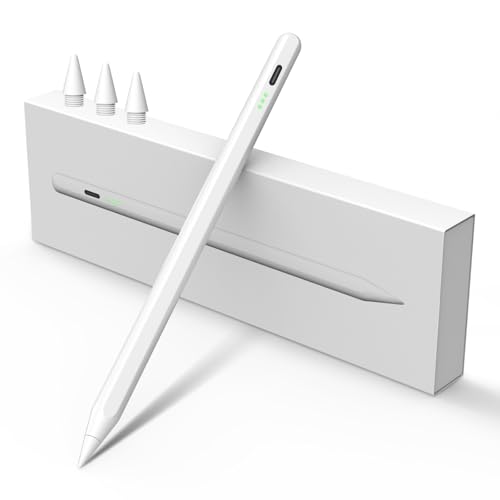
MEKO’s stylus delivers fast-charge capability with up to nine hours of active use after a 10–13 minute charge. It features a top-button for power control and uses a non-Bluetooth approach for quick setup, with standby functionality after idle time to save power. The model emphasizes broad compatibility with iPads released since 2018 and lists a comprehensive model compatibility guide. It’s designed for writers and designers who want a simple, responsive tool without needing an app or Bluetooth pairing.
HATOKU Stylus Pen For iPad 2018–2025

HATOKU’s pencil emphasizes quick charging and magnetic attachment for easy storage on compatible iPads. It supports tilt sensitivity and palm rejection for more natural drawing and note-taking. The device requires no Bluetooth pairing and powers off after inactivity to conserve energy. It’s aimed at users who want a premium-feel stylus with minimal setup that still provides reliable performance for writing, sketching, and marking PDFs on modern iPad models.
Metapen A8 iPad Pencil

Metapen A8 offers pixel-precise writing with 0.1 mm accuracy and a fast charge system that reaches full power in about 30 minutes. The stylus supports a long battery life—up to 10 hours—and a 5-minute auto-shutdown for efficiency. It includes durable tips designed to withstand heavy use and comes with extra tips for extended longevity. Note that it does not include pressure sensitivity, making it ideal for precise handwriting and fine line work rather than dynamic brush strokes.
KEEPRO Stylus Pen For iPad 2018–2025

KEEPRO’s USB-C fast-charging stylus focuses on pixel-precise tilt sensitivity and broad compatibility with iPad lines released since 2018. It features Bluetooth-less operation with straightforward button controls, and a magnetic or near-magnetic attachment approach on compatible devices. This model is designed for users who value quick charging, long usage times, and reliable tilt-aware input for writing, drawing, and annotating across various iPad generations.
Buying Guide: Key Purchase Considerations
- Compatibility: Confirm your exact iPad model and generation. Some styluses support only newer iPad Pro, Air, Mini, or 7th–11th generation tablets. Recheck model lists in the product description before purchasing.
- Input Experience: Decide if you need a precise 0.1 mm/1.5 mm tip or tilt sensitivity for shading and angled writing. Some pens offer palm rejection for comfortable long-form notes.
- Power and Charging: If you prefer quick charging, look for pens with fast charge times (often under 15 minutes) and long usage windows. Consider whether a magnetic attachment is important for portability.
- Bluetooth vs. No Bluetooth: Bluetooth-enabled styluses can offer extra features like shortcut buttons and app integration, but some users prefer Bluetooth-free models for simplicity and reliability.
- Pressure Sensitivity: Most styluses for writing do not offer true pressure calibration. If you want variable line thickness in art or notes, check for model-specific notes on pressure support.
- Tips and Durability: Look for replaceable tips and the availability of extra tips to extend the device’s life in daily use.
- Price and Warranty: Compare build quality across brands and check if the vendor offers a warranty or return window for peace of mind.
Across these options, a balance between compatibility, ease of use, and a comfortable writing feel is essential for sustaining productivity. For heavier note-takers or students, models with rapid charging and reliable tilt can make long sessions more efficient. For professionals who annotate documents or sketch ideas, higher precision input and palm rejection can improve workflow.