Finding a printer that delivers vibrant stickers without fuss can be tricky. This guide highlights five reliable inkjet-compatible options and sticker-supply bundles optimized for home use, school projects, or small businesses. Each entry includes a quick overview, key features, and practical notes to help you compare durability, color accuracy, and cost of ownership. Use this to choose a printer and compatible sticker media that match your creativity and budget.
| Product | Brand | Type |
|---|---|---|
| Epson EcoTank ET-2800 Wireless All-in-One Supertank | Epson | Cartridge-Free Supertank |
| HP DeskJet 2827e Wireless All-in-One | HP | Inkjet Printer |
| Joyberg Printable Sticker Paper (40 Sheets) | Joyberg | Sticker Paper |
| JOYEZA Premium Vinyl Sticker Paper (Glossy) | JOYEZA | Vinyl Sticker Paper |
| Lzerking Printable Vinyl Paper (100 Sheets) | Lzerking | Vinyl Sticker Paper |
Choosing the right setup involves considering print quality, media compatibility, drying times, and how long your stickers will last in indoor or outdoor settings. The following sections present five solid options, with objective details to aid decision-making. Each product block includes a direct link and visual reference to help you quickly assess fit for sticker projects.
Epson EcoTank ET-2800 Wireless Supertank Printer

The Epson EcoTank ET-2800 uses Micro Piezo Heat-Free Technology to deliver vivid color and detailed output for stickers and documents. Its cartridge-free system relies on refillable ink bottles, reducing ongoing costs and waste. Print speeds reach up to 10 pages per minute for efficient larger tasks. This model is designed for light homes and small offices seeking dependable color printing with straightforward maintenance and low per-page ink use.
Key features include a refillable ink system that can deliver thousands of prints per bottle set, and integrated scanning and copying functions. The printer emphasizes economy without sacrificing print clarity, which is beneficial for colorful sticker projects and crisp text materials alike. It supports a variety of sticker media when used within the manufacturer’s recommended media types and print settings.
HP DeskJet 2827e Wireless All-in-One
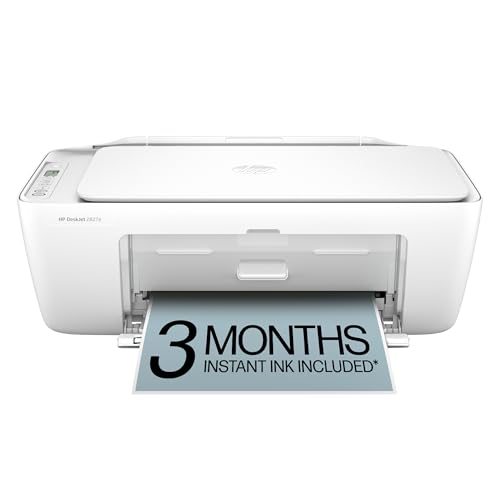
The DeskJet 2827e offers color printing, scanning, and copying with a compact design suitable for home offices. Print speeds reach about 5.5 pages per minute in color and 7.5 pages per minute in black, which helps when printing multiple sticker sheets or labels. HP AI features optimize printed content by removing extraneous elements for a cleaner, more precise result, making it easier to generate tidy label designs and aligned layouts.
Remarks include a 60-sheet input tray for light-to-moderate workloads and straightforward setup. This model emphasizes convenience and versatility for daily tasks, with robust driver support and wireless connectivity for easy access from laptops, tablets, or phones. It is compatible with a range of sticker papers intended for inkjet printing when aligned with the correct settings and seaming options.
Joyberg Printable Sticker Paper (40 Sheets)

Joyberg’s 40 sheet pack provides 8.5″ x 11″ sticker paper designed for inkjet printing. The sheets feature a full-sheet format with a clean backing and a matte, quick-drying surface. The paper is described as compatible with laser and inkjet printers, reducing jams and curling when used with compatible printer settings. The material supports crisp color output, making it suitable for decorative stickers, labels, and basic crafts.
Usage notes indicate that the sheets are easily cut with standard tools or cutting machines. The product includes a separation design to help users peel liners and apply stickers cleanly. For users seeking an economical way to create personalized sticker sheets, this option pairs well with hobby-level printers and standard media handling.
JOYEZA Premium Vinyl Sticker Paper (Glossy)

This JOYEZA glossy vinyl sticker paper is designed for inkjet printers and lasers, enabling durable, color-true decals and labels. The premium vinyl surface provides strong adhesion and high-resolution color reproduction. It is suitable for turning artwork into long-lasting stickers, decals, or branding elements for crafts and small business projects. The pack supports sharp details, making it a strong match for photos, logos, or illustrated designs that require vivid color depth.
Important considerations include compatibility with common cutting tools and the need to use compatible sealants or laminates if extra durability is required. The glossy finish emphasizes brightness and clarity, which benefits sticker aesthetics when used on light-colored backgrounds or bold graphics.
Lzerking Printable Vinyl Paper (100 Sheets)

Lzerking offers a bulk option with 100 sheets of white glossy printable vinyl. The sheets are designed for water-resistance and vivid color output for inkjet printers, with compatibility for cutting machines. The product highlights quick-drying ink and a strong finish that resists smearing after printing. This option suits larger sticker productions or ongoing project runs where cost-per-sheet is a key consideration.
Use guidance suggests pairing with Cricut or other cutting machines for precise shapes. The glossy surface helps achieve sharp, eye-catching graphics, while durable backing supports outdoor or indoor applications depending on post-processing like lamination. This choice is especially relevant for crafters who print many stickers in one sitting and require reliable sheet performance and ease of handling.
Buying Guide: Key Considerations For Sticker Print Projects
Printer type and media compatibility are foundational. Cartridgeless, refillable systems reduce running costs, but you must confirm that the printer supports the sticker media you plan to use. For high-contrast designs and vivid colors, select printers with robust color management, wide color gamuts, and reliable ink-flow control to prevent banding on larger sticker sheets.
Media selection matters. Matte vs. glossy vinyl, full-sheet sticker paper, and clear or white backing all affect final appearance and durability. Check compatibility with your cutting workflow if you plan to trim shapes with a Cricut or similar machine. Waterproof and lamination options extend life for outdoor or semi-exposed uses. Ensure the media you choose is rated for your printer type (inkjet vs. laser) to avoid jams or poor adhesion.
Print speed and duty are practical considerations. If you plan to produce multiple labels, a printer with reliable speed and consistent output reduces bottlenecks. Look for models offering efficient ink management and straightforward maintenance routines to avoid downtime. For sticker-heavy projects, bundling a supply of compatible vinyl or sticker paper with the printer can simplify procurement and ensure consistent results.
Quality controls matter. Printer resolution, color accuracy, and consistent drying times influence sticker vibrancy and legibility. Some users benefit from color calibration targets or profiles tailored to specific media. Additionally, consider whether you need built-in scanning or copying features for multi-use devices, or if a focused single-function printer will suffice for sticker production and document tasks.
Cost of ownership. While upfront hardware costs are important, ongoing consumables such as ink bottles or cartridges and sticker media drive long-term expenses. The ink-saving designs of some EcoTank systems can substantially reduce per-page cost, particularly when printing full sheets of labels. Compare per-page estimates based on your typical monthly output to choose the most economical setup.
In summary, the best inkjet printer for stickers depends on print volume, preferred media, and the level of durability you need. The options listed above provide a balance of reliable print quality, media compatibility, and practical features for hobbyists and small-scale makers. Evaluate how each model’s strengths align with your sticker projects to choose the most effective combination of printer and media.