When it comes to expanding your iPad Pro storage, using an external hard drive is one of the most efficient solutions. External drives offer the convenience of backing up photos, videos, and files without relying on cloud services. Below is a summary table of top external hard drives that work seamlessly with iPad Pro and other devices like iPhone, MacBook, and Windows PCs.
| Product | Storage Capacity | Key Features | Link |
|---|---|---|---|
| iDiskk 4TB Apple Certified External Hard Drive | 4TB | Built-in 2000mAh battery, one-tap backup, MFi certified, multi-device compatibility | View on Amazon |
| iDiskk 1TB Apple MFi Certified External Hard Drive | 1TB | One key backup, 10000mAh power bank, MFi certified, wide compatibility | View on Amazon |
| SSK Portable 1TB USB C SSD External Hard Drive | 1TB | Up to 1050MB/s speed, USB 3.2 Gen2, S.M.A.R.T monitoring, TRIM technology | View on Amazon |
| ySky 1TB Portable External Hard Drive for iPhone & iPad | 1TB | MFi certified, built-in 5000mAh battery, 3 cables included, one touch backup | View on Amazon |
| ySky 2TB External Hard Drive for iPhone & iPad | 2TB | Larger 2TB storage, MFi certified, built-in 5000mAh battery, 3 cables included | View on Amazon |
iDiskk 4TB Apple Certified External Hard Drive

iDiskk’s 4TB external hard drive is designed specifically for iPhone, iPad, MacBook, and Windows PCs, offering a vast storage capacity to back up photos, videos, and files. It includes a built-in 2000mAh battery, allowing you to transfer data without draining your iOS device’s battery. The MFi certified chip and connector provide stable, secure data transfer, compatible with the latest iPad Pro models and iPhones. The one-tap backup feature via the app ensures all your camera roll content is saved efficiently without duplicate files. This drive also supports in-app camera use that stores media directly into the hard drive, making it a versatile choice for photographers and content creators.
iDiskk 1TB Apple MFi Certified External Hard Drive
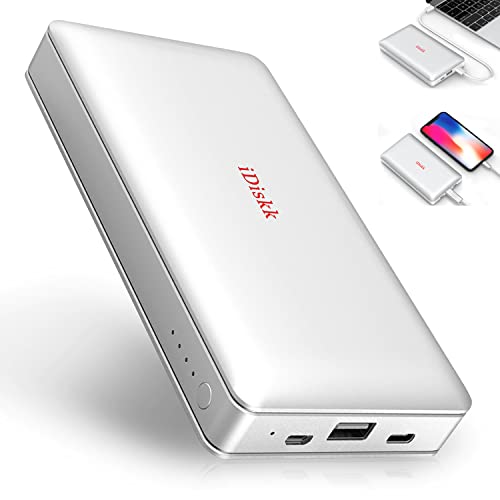
This 1TB iDiskk external hard drive provides ample storage to expand your iPad Pro’s capability without worrying about space. It features a massive 10000mAh power bank capacity to keep your device charged during transfers. The one key backup system simplifies saving your photos and videos, with future backups only copying newly added files to save space. This drive is officially MFi certified, ensuring compatibility with all recent iPhone and iPad models. Its wide compatibility also extends to Android devices, PCs, and Macs, making it a versatile storage tool for multiple device users.
SSK Portable 1TB USB C SSD External Hard Drive

The SSK 1TB Portable SSD offers blazing-fast speeds up to 1050MB/s, thanks to USB 3.2 Gen2 technology, ideal for users requiring quick access to large files on their iPad Pro or other devices. This external solid-state drive (SSD) is compatible with iPhone 15/Pro, Windows, Mac, and Android devices through USB-C. It also supports S.M.A.R.T monitoring and TRIM technology to optimize performance and prolong the drive lifespan. While its storage is slightly less than traditional HDD options, its robustness and speed make it a perfect fit for professional users handling intensive data tasks.
ySky 1TB Portable External Hard Drive for iPhone & iPad

The ySky 1TB external hard drive stands out with its built-in 5000mAh battery and inclusion of three data cables, eliminating the need for additional accessories and power sources. The device is MFi certified to ensure safe and stable data transfer for iPhone and iPad Pro series. It supports one-touch backup of photos and videos via its dedicated app, which also captures new photos and videos directly stored on the hard drive. This plug-and-play functionality allows easy use on iPhones, iPads, and computers anywhere, making it an excellent choice for users on the go.
ySky 2TB External Hard Drive for iPhone & iPad

The ySky 2TB external drive offers double the capacity of standard 1TB drives, making it ideal for heavy photo and video users seeking to free up internal space on their iPad Pro. It is MFi certified to guarantee compatibility and secure data handling with iOS devices. Like its 1TB counterpart, it includes a built-in 5000mAh battery and three different data cables for versatile connections. Its plug-and-play ease, one-touch backup, and password encryption options provide both convenience and security, suitable for professional and casual users alike.
Buying Guide for External Hard Drives Compatible with iPad Pro
Choosing the right external hard drive for your iPad Pro can enhance your productivity and storage capabilities. Here are key factors to consider:
1. Storage Capacity
Consider how much space you need based on your usage pattern. For casual users who mainly store photos and documents, 1TB or 2TB might be enough. Professionals handling large video files or extensive libraries may prefer 4TB or more.
2. Compatibility and Certification
Ensure the drive is MFi (Made for iPhone/iPad) certified for seamless integration and safe data transfers with iPad Pro models. Also, check if it supports multiple platforms if you intend to use it with other devices like Macs, Windows PCs, or Android phones.
3. Transfer Speed
External SSDs like USB 3.2 Gen2 drives offer faster data transfer speeds, making them preferable for users transferring large files frequently. HDDs generally provide more storage for the price but have slower speeds.
4. Power and Portability
Some external drives come with built-in batteries, allowing you to use them without draining your iPad battery or needing external power. Portability, along with included cables, simplifies usage on the go.
5. Backup Features and Ease of Use
Look for one-touch backup capabilities and companion apps that streamline file management. Automatic new file backups help avoid duplications and save time.
6. Security
Data encryption and password protection add layers of security, important if you store sensitive information on the external drive.
By evaluating these aspects, you can find an external hard drive that best fits your iPad Pro storage and data management needs.