Discover reliable, plug-and-play external CD/DVD writers that work with Windows, macOS, and Linux. This guide highlights five top picks with fast data transfer, broad compatibility, and durable designs for everyday use—from burning discs to reading legacy media. Each entry includes key features to help you compare at a glance.
| Product | Brand | Interface | Highlights |
|---|---|---|---|
| Amicool External DVD Drive | Amicool | USB 3.0 / USB-C | Dual interfaces, broad OS support, compact design |
| ROOFULL External CD/DVD Drive | ROOFULL | USB 3.0 | Protective case, high compatibility, easy plug & play |
| LG GP65NB60 | LG | USB 2.0 (USB 3.0 compatible) | Ultra-slim, M-DISC support |
| ASUS ZenDrive V1M | ASUS | USB-C | Cable storage, M-DISC support |
| JKNJX External Drive | JKNJX | USB 3.0 / USB-C | Plug & Play, broad OS compatibility |
Amicool External DVD Drive
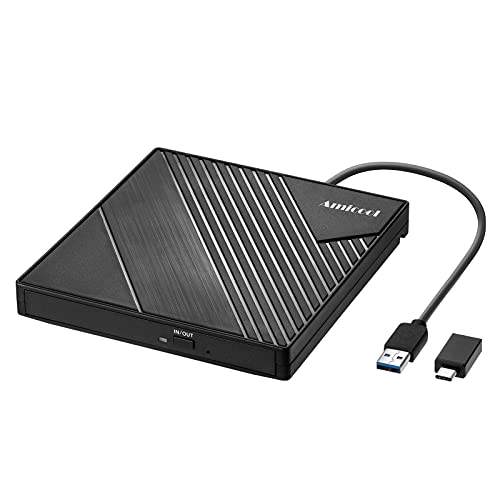
The Amicool external DVD drive offers dual interfaces, USB 3.0 and Type-C, facilitating data transfer up to 5Gbps. It supports DVD+R, DVD-R, CD-R, and CD-RW with read speeds up to 8x for DVDs and 24x for CDs. It is designed for plug-and-play use with Windows, Linux, and macOS. For best performance, connect directly to a computer USB port (rear ports on desktops) and avoid hubs or extension cables. Compatible with a wide range of devices, it is not suitable for TVs, game consoles, or standalone Blu-ray players. This model is ideal for users who need portable media burning and reading capabilities on laptops or desktops.
ROOFULL External CD/DVD Drive
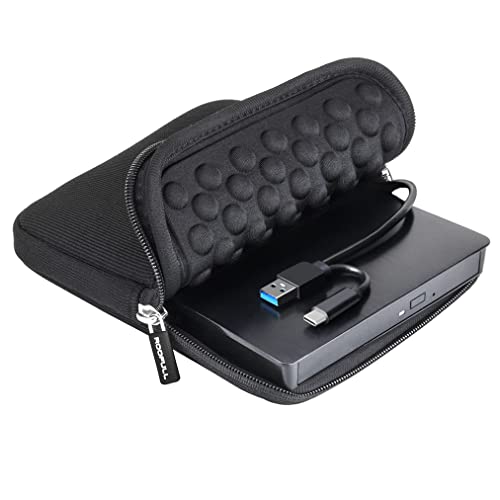
ROOFULL’s ECD829-Y is a durable external CD/DVD drive with protective carrying case. It supports all common CD and DVD formats (excluding Blu-ray and 4K discs) and emphasizes simple plug-and-play operation. With USB 3.0, it delivers fast data transfer up to 5 Gbps when connected directly to a computer or powered hub. The dual connectors (Type-A and Type-C) enhance compatibility across many laptops and desktops. It’s well-suited for playing DVDs, burning discs, or backing up data, particularly for users who prioritize ease of use and reliable performance.
LG GP65NB60 Ultra Slim Drive
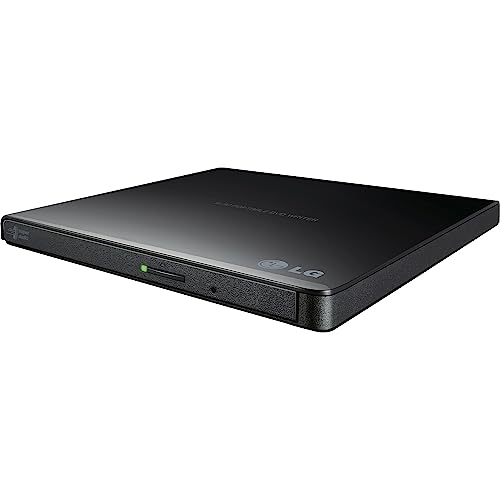
The LG GP65NB60 emphasizes portability with a thin 14-millimeter profile and USB 2.0 (compatible with USB 3.0). It supports up to 8x DVDR write speeds and offers M-DISC compatibility in some variants, making it a practical choice for users needing a compact, travel-friendly option. While USB 3.0 compatibility helps with newer systems, this model remains a popular choice for basic reading and burning tasks on both Windows and macOS environments.
ASUS ZenDrive V1M

ASUS ZenDrive V1M combines a USB-C interface with built-in cable storage, simplifying setup and reducing cable clutter. It supports M-DISC for long-term data preservation and is designed for use with Windows and macOS. The built-in cable makes it a convenient option for modern Ultrabooks and laptops that lack spare ports. This drive is suitable for users who want a tidy, reliable external optical solution with modern connectivity.
JKNJX External CD/DVD Drive

The JKNJX external CD/DVD drive emphasizes effortless plug-and-play operation with USB Type-A or Type-C connections and a compact, portable form factor. It supports high-speed USB 3.0 data transfer (up to 5 Gbps) and offers up to 8x DVD read/write and 24x CD read/write speeds. Compatible with a wide range of Windows versions, Linux, and macOS, it is designed for desktops, laptops, and all-in-one PCs. It is particularly suitable for users seeking broad compatibility and straightforward use without extra software.
Buying Guide
- Interface and compatibility: Look for USB-C and USB-A options to match modern and older devices. Ensure compatibility with your operating system (Windows, macOS, Linux) and check whether you need additional software for burning or playback.
- Read/write speeds: Most external drives offer up to 8x DVD and 24x CD read/write. If you frequently burn large discs, prioritize models with higher speeds and stable performance.
- Power and connectivity: Many models are bus-powered via USB. For desktops, using a rear USB port can improve reliability. Avoid hubs if possible to prevent power issues.
- Build and portability: Ultra-slim designs are ideal for travel, while rugged cases help protect the drive during transit. If you need to carry discs, consider a case-friendly model like ROOFULL with protective housing.
- Special features: M-DISC support provides long-term data retention. Built-in cable storage reduces clutter, and dual USB interfaces (USB-C and USB-A) offer flexibility with newer laptops and desktops.
- Limitations: External drives cannot read Blu-ray discs and may not be compatible with certain streaming devices or TVs. Verify that your intended use (burning, ripping, software installation) aligns with the drive’s capabilities.
- Power considerations: Some desktop setups require powered USB ports or direct motherboard connections to ensure stable operation; laptops may need battery support considerations for longer burning tasks.
- Price-to-performance: Compare the included features, such as protective cases, dual connectors, and bundled software or compatibility notes, to determine which model offers the best value for your needs.