If you suffer from wrist pain or discomfort while using a computer mouse, selecting the right ergonomic mouse can significantly reduce strain and improve comfort. Below is a concise table summarizing the top ergonomic mice designed to promote a natural wrist position, minimize repetitive strain injuries, and enhance productivity.
| Product | Brand | Connectivity | DPI Settings | Rechargeable |
|---|---|---|---|---|
| ProtoArc EM11 NL Bluetooth Rechargeable Wireless Vertical Mouse | ProtoArc | Bluetooth 5.0 & 2.4G USB | Not Specified | Yes |
| Anker 2.4G Wireless Vertical Ergonomic Optical Mouse | Anker | 2.4G Wireless | 800/1200/1600 | No (Batteries) |
| Lekvey Vertical Wireless Mouse with Rechargeable Battery | Lekvey | 2.4G Wireless USB Receiver | 800/1200/1600 | Yes |
| Logitech Lift Vertical Ergonomic Mouse | Logitech | Bluetooth or USB Logi Bolt Receiver | Not Specified | Not Specified |
| Anker Ergonomic Optical USB Wired Vertical Mouse | Anker | USB Wired | 1000/1600 | No |
ProtoArc Ergonomic Bluetooth Rechargeable Vertical Mouse

The ProtoArc EM11 NL mouse excels with its ability to connect to three devices simultaneously using dual Bluetooth 5.0 and 2.4GHz USB wireless modes, making switching between computer, laptop, and tablet seamless. It fits Windows, Mac OS, and Android platforms. This vertical mouse prioritizes keeping your wrist in a natural, relaxed position, which reduces discomfort and helps prevent repetitive strain injuries by aligning your forearm and wrist ergonomically. Its rechargeable 500mAh Li-ion battery and Type-C charging cable add convenience, eliminating the need for frequent battery replacements. Users are advised to hold the mouse in a relaxed palm posture to maximize ergonomic benefits.
Anker Wireless Vertical Ergonomic Optical Mouse

This Anker vertical ergonomic mouse is designed in a scientific ‘handshake’ posture to promote a healthy wrist and arm position, reducing strain during extended use. It features adjustable DPI levels (800, 1200, 1600) for precision tracking and enhanced sensitivity across various surfaces. The mouse includes five buttons, notably convenient “next” and “previous” buttons for efficient web browsing and workflows. Its wireless 2.4GHz connection provides freedom of movement for laptops and desktop computers alike, ideal for office workers and gamers who seek comfort without sacrificing performance.
Lekvey Vertical Wireless Rechargeable Ergonomic Mouse

The Lekvey ergonomic mouse supports healthy wrist angles with its scientifically engineered vertical design. It offers a rechargeable built-in battery, eliminating the need for disposable cells, and uses a simple plug-and-play nano USB receiver that avoids Bluetooth connectivity hassles. The mouse features six buttons, including forward/back functionality to enhance browsing or document navigation. Users can adjust DPI settings among 800, 1200, and 1600, tailoring sensitivity to their preferences. This mouse is compatible with laptops, PCs, desktops, and notebooks, delivering reliability alongside ergonomic benefits.
Logitech Lift Vertical Ergonomic Mouse with Bluetooth

The Logitech Lift is tailored for small to medium right-handed users offering an upright vertical design that reduces wrist strain by maintaining a natural arm posture. Its softly textured grip and thumb rest boost comfort throughout the workday. The mouse supports connection via Bluetooth or Logitech’s Logi Bolt USB receiver, compatible across Windows, macOS, and iPadOS platforms. The 57-degree vertical angle fosters an ergonomic wrist position to help alleviate repetitive stress and improve productivity for office and creative professionals alike.
Anker Ergonomic Wired Optical Vertical Mouse
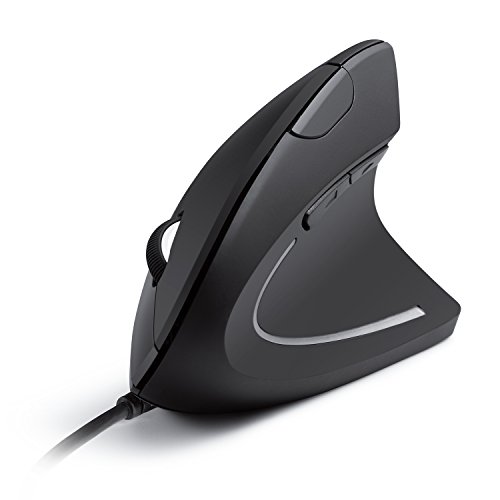
This Anker wired vertical mouse offers the ultimate comfort for users needing a simple, no-interference wired device. It employs a ‘handshake’ ergonomic design to keep the wrist and arm in a neutral position, supporting smoother movements with less strain. Featuring optical tracking technology with selectable 1000 or 1600 DPI settings, it ensures precise cursor control across many surfaces. The inclusion of next and previous buttons facilitates effortless web navigation, making it a practical wired alternative for users who prefer a stable connection without lag or battery worries.
Buying Guide for Choosing the Best Ergonomic Mouse for Wrist Pain
When selecting an ergonomic mouse, especially to mitigate wrist pain, consider these key aspects to ensure the best fit for your needs:
Ergonomic Design and Comfort
- Vertical vs. Traditional Shape: Vertical mice promote a more natural wrist “handshake” posture, reducing forearm twisting and minimizing strain.
- Fit and Size: Choose a mouse that matches your hand size and grip style (palm, claw, or fingertip) for maximum comfort.
- Grip Texture and Thumb Rest: Soft grips and well-positioned thumb rests provide additional comfort during long use periods.
Connectivity Options
- Wireless vs. Wired: Wireless mice offer freedom of movement and reduced cable clutter but require battery management; wired mice eliminate latency and battery concerns.
- Multi-Device Connectivity: Some mice connect to multiple devices simultaneously via Bluetooth and USB dongles, enhancing productivity for multi-device users.
DPI and Tracking Sensitivity
- DPI Settings: Adjustable DPI (dots per inch) allows you to control cursor sensitivity to match different tasks and screen sizes.
- Sensor Quality: Optical sensors with higher DPI range enable precise and smooth tracking on diverse surfaces.
Additional Functional Buttons
- Navigation Buttons: Forward and backward buttons on the mouse save time by streamlining webpage and document navigation.
- Programmable Buttons: Extra customizable buttons enhance efficiency for gaming and specialized software use.
Rechargeable vs. Battery-Powered
- Rechargeable Batteries: Convenient and eco-friendly, rechargeable mice reduce the need to frequently replace batteries.
- Battery Life: Consider how long the mouse lasts on a single charge or battery set to avoid interruptions.
Compatibility
- Ensure the mouse is compatible with your operating system(s), such as Windows, macOS, Linux, or Android.
By weighing these factors carefully according to your workflow and pain relief needs, you can choose an ergonomic mouse that effectively supports your wrist health while enhancing your computer interaction.