The right keyboard can make long workdays more comfortable, especially for users with smaller hands. This guide highlights ergonomic keyboards designed to reduce wrist fatigue, encourage natural typing postures, and fit compactly in smaller workspaces. Each option focuses on features like wave-shaped or split designs, cushioned rests, and reliable wireless or wired connections. Explore five highly relevant picks that address comfort, usability, and compatibility across Windows and Mac systems.
Product Quick Reference
| Product | Brand | Key Benefit for Small Hands |
|---|---|---|
| Logitech Wave Keys Wireless Ergonomic Keyboard (Graphite) | Logitech | Compact Wave Keys design brings mouse closer for natural shoulder position |
| Arteck Ergonomic USB Wired Keyboard with Cushioned Wrist & Palm Rest | Arteck | Split design with cushioned wrist rest and backlit keys |
| Arteck Split Ergonomic Keyboard (2.4G USB Wireless) | Arteck | True split ergonomic layout with soft wrist support |
| Ergonomic Wireless Keyboard with Cushioned Wrist Rest (Wave Keys) | EAYBLLY | Wave-shaped keys and integrated wrist support for natural typing |
| Nulea RT08 Wave Keys Wireless Ergonomic Keyboard | Nulea | Full key layout with wave shape to ease finger stretch |
Below you’ll find concise, objective details for five carefully chosen options. Each section includes an accessible image, a direct link to the product page, and a summary of features tailored for smaller hands. Consider how each design—from wave keys to split layouts—aligns with your typing style, desk space, and device ecosystem.
Logitech Wave Keys Wireless Ergonomic Keyboard (Graphite)

The Wave Keys design emphasizes a compact footprint that helps keep the mouse closer to the body, supporting a more natural shoulder position which benefits users with small hands. The keyboard’s wave-inspired contour places hands, wrists, and forearms in a comfortable, neutral alignment. This setup is particularly suitable for those who work long hours and want to minimize strain without sacrificing full-size functionality. With Bluetooth and Logi Bolt Receiver compatibility, it supports multiple OS environments, including Windows and Mac. The compact keys promote a relaxed typing stance while preserving essential function keys.
Key considerations: the graduate-friendly wave layout can reduce reach and forearm tension, making it a strong candidate for office desks with limited space. Wireless versatility supports various devices, and the compact footprint is ideal for users who favor a closer desk setup. Potential trade-offs include adapting to a wave form if you’re used to flat keyboards, but many users report a smoother, more natural typing rhythm after a short adjustment period.
Arteck Ergonomic USB Wired Keyboard with Cushioned Wrist & Palm Rest

This Arteck model focuses on an ergonomic split design paired with a cushioned wrist rest. The split arrangement encourages a natural alignment of wrists and forearms, which is especially beneficial for users with smaller hands who might otherwise experience pressure at the base of the palms. The built-in cushioned wrist rest adds support during long typing sessions, while backlighting with seven color options can aid visibility in low-light workspaces. It remains a wired option, ensuring a stable connection without interference or battery concerns. It’s compatible with Windows and Mac systems via USB, offering plug-and-play simplicity.
Key considerations: a true split layout can require a short adaptation period but often yields sustained comfort. The wired connection eliminates wireless pairing issues, which can be preferred in shared workstations. If you value backlit keys for late-night typing, this Arteck model delivers practical utility alongside ergonomic design.
Arteck Split Ergonomic Keyboard with Cushioned Wrist and Palm Rest

The split design of Arteck’s second option emphasizes a relaxed wrist and forearm position, with a soft cushioned wrist rest to support comfortable typing. The layout makes it easier to align hands with natural forearm angles, helping to reduce lateral wrist strain during tasks like data entry or extended document work. The setup is straightforward: connect via USB, and you’re ready for instant use without driver installations. Desktop users who appreciate a traditional wired footprint with ergonomic enhancements may find this keyboard particularly appealing.
Key considerations: split layouts can demand a brief adjustment period, especially for users transitioning from a single-block keyboard. The included palm/wrist rest helps mitigate fatigue, but the overall feel will depend on your personal typing width and desk geometry. If you need reliable plug-and-play performance with no latency concerns, this Arteck option offers a practical, ergonomic alternative.
Ergonomic Wireless Keyboard with Cushioned Wrist Rest (Wave Keys)

This keyboard combines Wave Keys ergonomics with a cushioned wrist rest to offer a natural typing posture and reduced hand pressure. The integrated wrist support is designed to complement the wave-shaped keys, which encourage a more relaxed, curved hand position. A 2.4GHz wireless connection ensures stable performance within a typical office range, reducing lag during typing and document editing. The layout supports Windows and Mac operating systems, suitable for mixed-device setups in homes or small offices.
Key considerations: if you prefer a fully wireless experience with a focus on wave-key comfort, this option provides a cohesive ergonomic package. The finger travel distance and key spacing should be considered in relation to your hand width, as every user’s experience with wave key geometry can vary. Battery life and USB receiver range are practical factors to assess for your workspace setup.
Nulea RT08 Wave Keys Wireless Ergonomic Keyboard

The Nulea RT08 emphasizes a distinctive wave-shaped key arrangement designed to fit the natural curve of the hand. The full-key layout ensures access to function keys and special operations without sacrificing ergonomic comfort, making it suitable for both office productivity and creative tasks. Its wireless 2.4GHz connection supports a typical room distance and reduces cable clutter, which is beneficial for smaller desks. The keyboard is advertised as plug-and-play with Windows and Mac compatibility, offering a familiar setup for users who are new to ergonomic keyboards.
Key considerations: wave-key ergonomics can reduce finger reach and wrist strain, but it may require a short acclimation period. If you value a broader key layout with a focus on wrist comfort, this model provides a balanced option. Check battery life expectations and the stability of the USB receiver in tight workspace environments.
Nulea RT07B Wireless Ergonomic Keyboard (Split)
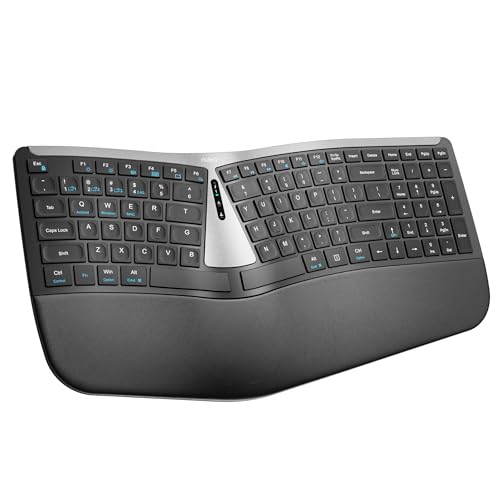
Nulea’s split keyboard model is designed to minimize forearm twisting by offering a natural typing position with a dedicated palm rest. The split layout is paired with Bluetooth plus USB-C rechargeable capability, allowing flexible connectivity across devices and operating systems. A long battery life reduces downtime, which is beneficial for users who work away from desk outlets. The soft palm rest and ergonomic spacing aim to support sustained comfort during extended typing sessions.
Key considerations: split keyboards are highly adaptable for ergonomic improvement but require an initial period of adjustment. The Bluetooth/USB-C rechargeable versatility is a big plus for multi-device ecosystems. If you frequently switch between devices, this model can provide convenient cross-platform use without sacrificing ergonomic benefits.
RECCAZR Ergonomic Keyboard with Wrist Rest

The RECCAZR keyboard emphasizes an ergonomic curved key layout, an electronic design intended to promote a natural typing posture. A soft, foldable wrist rest helps reduce hand and wrist pressure, while silent membrane keys provide a responsive feel without loud keystrokes. The combination of ergonomic curvature and a cushioned rest is aimed at prolonging comfortable use during office tasks, particularly for users who spend long hours typing. This wired option supports straightforward setup and broad compatibility with Windows PCs and laptops.
Key considerations: quiet keys and a comfortable wrist rest can enhance daily productivity for long sessions. The stepped or curved keycap arrangement is designed to ease finger access, though the experience will depend on your typing style and hand size. If you prefer a traditional wired keyboard with ergonomic refinements, this model offers a practical balance of comfort and familiarity.
Buying Guide: Key Considerations For Small Hands
- Ergonomic design type: Wave or split layouts both aim to reduce strain. Wave designs often reduce shoulder reach and forearm rotation, while split layouts explicitly separate left and right sections to align wrists naturally. Try a model with a design that matches your tolerance for adjustment and workflow needs.
- Wrist support: Cushioned palm rests or soft wrist supports can greatly impact comfort during extended typing. Consider whether a full palm rest, a partial rest, or no rest fits your desk and posture preferences.
- Connectivity: If you sit at a fixed desk, a wired keyboard eliminates pairing concerns. For flexible layouts or multiple devices, wireless options (2.4GHz or Bluetooth) add versatility. Ensure compatibility with your OS and devices (Windows, macOS, tablets).
- Key feel and layout: Wave-key designs may feel different to traditional keyboards. Split designs may require an adaptation period. If possible, test both layouts to determine which minimizes finger reach and keeps wrists straight during typing.
- Desk space and footprint: Compact keyboards save space and reduce reach. Measure your workstation to ensure the keyboard doesn’t crowd the mouse or trigger awkward arm angles.
- Battery life and maintenance: For wireless keyboards, consider battery life, charging options, and whether a USB-C or proprietary receiver is used. Wired models remove battery concerns altogether.
- Build quality and reliability: Look for reinforced palm rests, sturdy key mechanisms, and stable wireless connections to ensure long-term comfort and performance.
In sum, choosing an ergonomic keyboard for small hands involves balancing design philosophy, device compatibility, and workspace constraints. Wave-shaped keys often work well for minimizing shoulder and forearm strain, while split designs can be highly effective for users who value precise hand positioning. Consider trying models with cushioned wrists and reliable connectivity to maximize comfort and productivity across Windows and Mac environments.