Choosing a reliable EcoTank printer can streamline sublimation projects by pairing high-capacity ink systems with simple refills and solid print quality. This guide highlights five Epson EcoTank models that balance cost efficiency, print quality, and feature sets suitable for sublimation tasks and home/office use. Each option incorporates cartridge-free ink tanks and versatile connectivity to support small businesses, crafters, and hobbyists alike.
Summary of chosen products
| Product | Brand | Key Sublimation Fit |
|---|---|---|
| Epson EcoTank ET-2800 Wireless Color All-in-One Supertank | Epson | Compact home use; cartridge-free printing; affordable ink refills |
| Epson EcoTank ET-4800 Wireless All-in-One | Epson | All-in-one with ADF; strong for scanning/copying large batches |
| Epson EcoTank ET-15000 Wireless Color All-in-One | Epson | Large-format capabilities; ideal for bigger sublimation sheets |
| Epson EcoTank ET-3843 Wireless All-in-One | Epson | Balance of compact size and feature set for home office |
| Epson EcoTank ET-4950 Wireless All-in-One | Epson | High page yield; robust for busy sublimation workflows |
Epson EcoTank ET-2800 Wireless Color Supertank Printer

The ET-2800 is a compact all-in-one with cartridge-free printing and a user-friendly EcoFit ink bottle system. It supports color and grayscale outputs suitable for transfer proofs and mockups, while its Micro Piezo Heat-Free Technology helps preserve print clarity on various media. The in-box ink supply can reduce early refill needs, making it a strong option for light to moderate sublimation projects at home or in small studios.
Key features include high-capacity EcoTank ink tanks, easy filling with EcoFit bottles, and claimed savings on replacement ink. The printer is designed for everyday tasks beyond sublimation, including scanning and copying, which adds workflow versatility for craft businesses that handle proofs and customer documentation.
Epson EcoTank ET-4800 Wireless All-in-One

The ET-4800 adds a few enhancements over the basics: a broader feature set with a built-in all-in-one system and scanned-to-email capability. It emphasizes cartridge-free printing with EcoFit ink bottles, integrating Micro Piezo technology for sharp text and detailed color output. This model supports a wide variety of media types and is a solid option for hobbyists who regularly produce transfer-ready designs and documents, alongside general office tasks.
With zero cartridge waste and a focus on long-term savings, the ET-4800 aligns with operators looking to minimize ongoing consumable costs while maintaining image quality for sublimation proofs and general graphic printing.
Epson EcoTank ET-2800 Wireless Color All-in-One (Black)

This variant keeps the ET-2800’s core strengths in a darker chassis, offering the same cartridge-free design and efficient ink usage. Its print speed of up to 10 pages per minute for monochrome and color output suits small-volume runs of sublimation proofs and transfer sheets. The device’s connectivity supports wireless printing from laptops and mobile devices, enabling flexible workflows for home studios and classrooms alike.
Its emphasis on low-cost ink replacement and high-yield bottles makes it a practical option for creators who require consistent results without frequent cartridge replacements, especially for learning and testing transfer designs.
Epson EcoTank ET-15000 Wireless Color All-in-One

The ET-15000 targets users needing wider print formats, supporting up to 13 x 19 inches, an attractive feature for sublimation pros who work with larger transfers. Its all-in-one functionality—printer, scanner, and copier—keeps project management centralized. Built-in wireless and Ethernet/USB connections support a broad range of devices and networks, enabling smoother collaboration in small studios. Cartridge-free printing remains a core benefit, with EcoFit inks designed for easy, mess-free refills.
Epson EcoTank ET-3843 Wireless All-in-One

The ET-3843 positions itself as a compact, feature-rich option for home offices and small studios. While primarily designed for everyday tasks, its EcoTank system ensures cost-effective long-run printing for transfer samples and test runs. The printer’s cartridge-free design means less maintenance and a steady workflow for creators who perform iterative testing on sublimation layouts and color accuracy across media types.
Epson EcoTank ET-4950 Wireless All-in-One
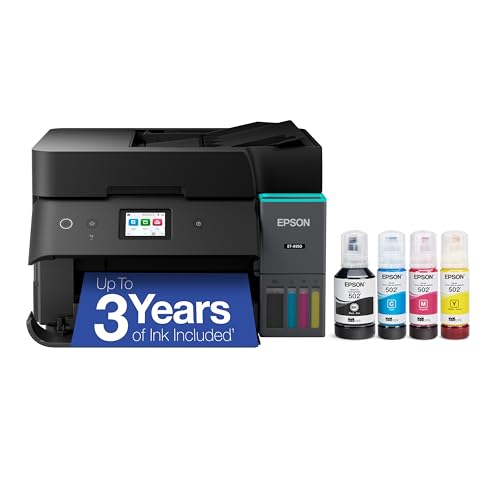
The ET-4950 offers a robust, high-capacity solution with a long ink life and a 2.4″ color touchscreen. Its Auto Document Feeder supports efficient handling of multi-page transfers, scans, and copies. With its sizable ink supply and EcoFit bottles, it is well-suited for users who regularly generate transfer proofs and need reliable, repeatable performance across large print runs for sublimation projects and business documents alike.
Buying Guide: Key Considerations For Choosing An Epson EcoTank For Sublimation
- Ink system and yield: Look for high-capacity EcoTank ink tanks and ink bottles that can deliver thousands of prints. A higher yield reduces refill frequency during larger sublimation runs.
- Print size and media compatibility: If you plan larger transfers, consider models that support wider formats or at least standard letter/A4 with flexible media handling. Confirm opacity and transfer compatibility for fabrics and substrates you use.
- Inks and color performance: Epson’s Micro Piezo technology and heat-free designs help preserve fine lines and color accuracy. Ensure the printer’s color management aligns with your sublimation workflow.
- Connectivity and workflow: Wireless printing, Ethernet, and USB options support flexible setups. An ADF (auto document feeder) is valuable for batch scanning and copying tasks.
- Maintenance and reliability: Cartridge-free systems minimize messy replacements and cartridge waste. Check for in-box ink availability and refill simplicity with EcoFit bottles.
- Cost of ownership: Compare total cost of ownership by factoring ink bottle cost, yield, and any required maintenance supplies. EcoTank models typically offer lower cost per page than cartridge-based printers over time.
- Size and space: Some models are compact for home studios, while others scale up for busy small offices. Measure workspace to ensure a good fit.
- Support and ecosystem: Consider warranty terms and access to drivers and software updates that support sublimation workflows and transfer profiling.
These considerations help balance upfront price, ongoing ink costs, and the reliability needed for consistent sublimation proofs and final pieces. When selecting a model, align features with your typical print volume, sheet size, and media types to ensure the best fit for your creative and production needs.