When it comes to video editing, using the right drive or workstation can significantly impact your workflow and output quality. Whether you need blistering fast SSD storage or a complete video editing PC equipped with powerful CPUs and GPUs, this guide highlights the best drives and systems for video editing that combine speed, reliability, and efficiency. Below is a summary table of the top picks designed for professional and amateur editors alike.
| Product | Brand | Key Features |
|---|---|---|
| WD_BLACK 2TB SN8100 NVMe SSD | WD_BLACK | PCIe Gen 5, 14,900 MB/s read, low power consumption |
| CPU Solutions 4K/8K Video Editing PC | CPU | 128GB RAM, Intel Core Ultra 7, RTX 2000ADA GPU |
| CPU Solutions VidCore 4K Video Editing PC | CPU | Core Ultra 9 285K processor, 128GB RAM, Quadro RTX 2000 ADA |
| CPU Solutions VidCore Editing PC 4K/8K | CPU | Quadro RTX 4000 ADA, 128GB RAM, 2TB NVMe SSD storage |
| Crucial T700 1TB Gen5 NVMe SSD | Crucial | 11,700 MB/s read, DirectStorage enabled, M.2 SSD |
WD_BLACK 2TB SN8100 NVMe SSD for Video Editing

The WD_BLACK 2TB SN8100 NVMe SSD is built with the next-generation PCIe Gen 5 interface, offering breakthrough speeds of up to 14,900 MB/s read and 14,000 MB/s write. This makes it ideal for handling large video files and complex timelines efficiently. It utilizes TLC 3D CBA NAND technology for durability and performance, while its power efficiency surpasses the previous generation with an average operating power of 7W or less.
Its high IOPS rating supports seamless multitasking and faster loading times, making it excellent for AI applications, gaming, and especially intensive video editing projects where speed and reliability are critical.
CPU Solutions 4K/8K Video Editing PC with RTX 2000ADA

This custom PC is designed for professional 4K and 8K video editing. Featuring a 15th Gen Intel Core Ultra 7 processor with 20 cores and 20 threads, it excels at multitasking and intense processing tasks. Along with 128GB of RAM, it accommodates large video files and complex edits without lag.
The addition of a Quadro RTX 2000 ADA graphics card with 16GB GDDR6 ECC memory enhances rendering and playback performance. The multi-monitor support with four Mini DisplayPort outputs allows an expansive editing workspace. Its efficient cooling system with a bronze-certified 650W power supply ensures stable operation during long editing sessions.
CPU Solutions VidCore 4K Video Editing PC with Core Ultra 9

Equipped with a powerful 15th Gen Intel Core Ultra 9 285K processor boasting 24 cores and turbo speeds up to 5.7 GHz, this PC is aimed at editors who demand extreme performance. Its 128GB DDR5 RAM capability supports intense multitasking and 3D modeling alongside video editing.
The Quadro RTX 2000 ADA GPU provides accelerated graphics performance with rich features like CUDA cores and Tensor technology. Its extensive connectivity options and robust liquid cooling system ensure high stability under heavy workloads, making this a reliable workstation for 4K and 8K editing environments.
CPU Solutions VidCore Editing PC with RTX 4000 ADA GPU
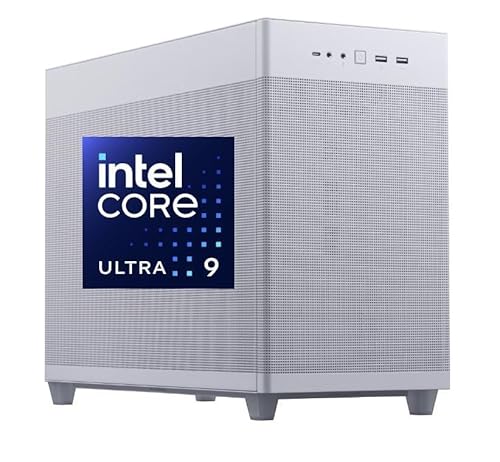
This high-end workstation features the Intel Core Ultra 9 285K with 24 cores and up to 5.7 GHz turbo boost, paired with 128GB RAM and a speedy 2TB NVMe M.2 SSD. It caters to heavy-duty video editing, 3D modeling, and large-scale projects requiring mass memory and fast storage.
The standout feature is the Quadro RTX 4000 ADA with 20GB GDDR6 memory, supporting multiple high-resolution monitors at 4K, 5K, and 8K resolutions. Its broad connectivity includes USB 3.2, Type-C, and Wireless 6, all housed in a thermally managed tower with a 750W power supply to sustain peak performance.
Crucial T700 1TB Gen5 NVMe M.2 SSD for Creative Workflows

The Crucial T700 1TB NVMe SSD leverages Gen 5 PCIe technology to deliver incredible speeds of up to 11,700 MB/s sequential reads and 9,500 MB/s writes. It is DirectStorage enabled, which drastically reduces load times and CPU usage, beneficial for video editing and gaming.
This drive easily fits in your motherboard’s M.2 slot and is compatible with existing heatsinks for optimal cooling. The T700 balances high throughput with reliability, making it suitable for professionals working with UHD and 8K footage looking for solid-state speed and endurance.
Buying Guide for Choosing the Best Drive or PC for Video Editing
When selecting storage or a complete PC solution optimized for video editing, consider the following crucial factors to match your workflow and project requirements:
Speed and Interface
Video editing demands rapid read/write speeds for smooth playback and quick export. NVMe SSDs with PCIe Gen 4 or Gen 5 interfaces deliver exceptional bandwidth. PCIe Gen 5 (like the WD_BLACK and Crucial T700) provides cutting-edge speeds that future-proof your setup. Confirm your motherboard supports these interfaces for maximum performance.
Storage Capacity and Expansion
Editing high-resolution videos or 3D graphics requires substantial storage. Drives ranging from 1TB to 2TB offer a balance between space and cost, but ensure the option to expand with external or internal storage. Some PCs come pre-equipped with fast NVMe SSDs and ample RAM to handle large files efficiently.
RAM and Processor Power
Large RAM sizes (64GB or more) enable smooth multitasking and timely rendering. Multi-core processors like Intel’s 15th Gen Core Ultra series (7 or 9 variants) provide the horsepower needed for editing 4K-8K videos or performing complex effects. A combination of CPU speed and core count improves editing efficiency.
Graphics Card
Professional GPUs such as NVIDIA Quadro RTX 2000 or RTX 4000 ADA deliver accelerated rendering, high-resolution monitoring, and software optimizations essential for editing software like Adobe Premiere Pro, DaVinci Resolve, or Autodesk.
Thermal Management and Power Supply
Video editing induces sustained high system loads. Efficient cooling solutions—whether liquid or air-based—are crucial for performance stability. Bronze or higher-certified power supplies provide reliability and save energy during long sessions.
Connectivity and Expandability
Look for multiple USB ports, including Type-C and USB 3.2 Gen 2 for fast peripheral connection and external storage access. Support for multiple 4K+ monitors through DisplayPort or HDMI enhances workspace capacity.
Portability and Backup Options
For editors on the go, portable high-speed flash drives with multi-interface support (USB, Lightning, Type-C) provide convenient data backup and transfer options across devices.
Choosing the right drive or all-in-one system customized for video editing depends on balancing speed, capacity, graphics capability, and budget. The products listed combine these aspects and are among the best suited for video editors aiming for efficient workflows without compromise.