The Mac Mini M4 is a compact powerhouse, but pairing it with the right display and docking station can significantly enhance your productivity and workspace organization. This article reviews top docking stations and display hubs designed specifically for the Mac Mini M4 and M4 Pro 2025 models. These docks offer robust connectivity, multi-monitor support, high-speed data transfer, and expanded storage options including NVMe SSD enclosures. Below is a summary of the leading products ideal for maximizing the Mac Mini’s full potential.
| Product Name | Brand | Main Features |
|---|---|---|
| UGREEN Mac mini M4 Dock and Stand DP Hub with M.2 SSD | UGREEN | Supports up to 8TB NVMe SSD, 4K 144Hz/240Hz DisplayPort output, 10G USB A/C ports, SD/TF, audio jack |
| ACASIS 40Gbps Dock with Dual-Bay NVMe SSD Enclosure | ACASIS | Dual M.2 NVMe slots with RAID support, dual 4K@60Hz DisplayPort, 40Gbps throughput, 3x 10G USB-A ports |
| Macally Mac mini M4 Dock and Stand Hub | Macally | 3 USB-A 2.0 ports, NVMe/SATA SSD enclosure up to 8TB, 4K HDMI 60Hz, SD/MicroSD readers, audio jack |
| RayCue Mac mini M4 Dock with Aluminum Stand and HDMI Hub | RayCue | 10-in-1 USB-C hub, 8TB NVMe/SATA SSD support, 4K HDMI 60Hz, multiple USB ports, SD/TF card, audio |
| Minisopuru iExpandMate MINI4PRO Hub and Stand | minisopuru | 4TB NVMe SSD enclosure, 4K 60Hz HDMI, USB-A 2.0 ports, TF/SD card slots, optimized for Wi-Fi stability |
UGREEN Mac mini M4 Dock and Stand DP Hub with M.2 NVMe SSD Enclosure

The UGREEN Mac mini M4 Dock and Stand offers expansive connectivity tailored for the Mac Mini M4 and M4 Pro 2025 models. It supports up to 8TB of ultra-fast M.2 NVMe SSD storage (SSD not included), perfect for handling large files and 4K content editing. The dock provides a 4K 144Hz DP port for M4 and 4K 240Hz for M4 Pro, ensuring crisp, lag-free visuals for creative professionals or entertainment. Additional features include 10Gbps USB A/C ports, SD/TF card readers, and an audio jack, enabling versatile device connectivity in a compact design. This dock also integrates a stand optimized to hold your Mac Mini securely while expanding its capabilities.
ACASIS 40Gbps Mac mini M4 Dock with Dual-Bay NVMe SSD Enclosure
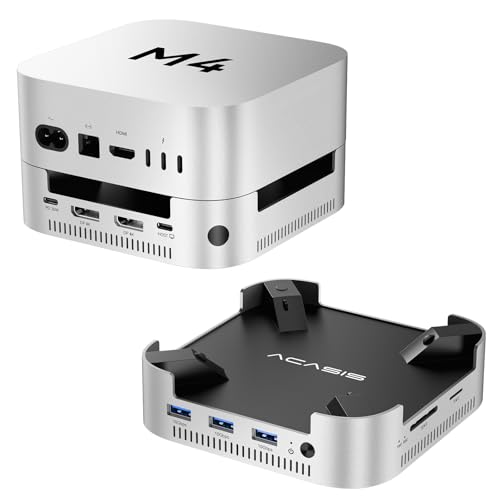
The ACASIS Dock is a high-performance workstation hub that supports dual 8TB M.2 NVMe SSDs with RAID 0/1/JBOD configurations, offering speeds up to 40Gbps. Its dual DisplayPort outputs allow for dual 4K@60Hz monitors, expanding your desktop real estate for multitasking or presentations. Three 10G USB-A ports, SD/TF 4.0 card readers, and 30W power delivery provide comprehensive connectivity options. Constructed from durable aluminum, this dock is ideal for professionals needing large storage with fast transfer speeds combined with multi-screen capabilities on their Mac Mini M4 or M4 Pro.
Macally Mac mini M4 Dock and Stand Hub with SSD Enclosure and HDMI

Designed to maximize workspace efficiency, the Macally dock combines a USB hub, SSD enclosure, and stand in one compact unit. It supports up to 8TB NVMe or SATA SSDs for extensive storage and includes 3 USB-A 2.0 ports, SD/TF card slots, 4K HDMI 60Hz, and a 3.5 mm audio jack. The dock’s stand design helps keep your Mac Mini setup tidy and accessible. This hub is ideal for users seeking easy port access and additional storage, with straightforward multi-monitor connectivity through HDMI.
RayCue 10-in-1 Mac mini M4 Dock with Aluminum Stand and HDMI

This RayCue dock features a versatile 10-in-1 hub that includes a built-in M.2 NVMe/SATA SSD enclosure supporting up to 8TB, 4K HDMI output at 60Hz, multiple USB ports (10G USB A/C, USB A 5G), SD/TF card readers, and a headphone jack. Its aluminum stand complements the Mac Mini M4’s aesthetics while providing functional port expansion. The dock supports seamless video output for presentations, entertainment, or creative projects, making it a well-rounded addition for enhancing productivity.
Minisopuru iExpandMate MINI4PRO Mac mini M4 Dock with 4K HDMI

The Minisopuru iExpandMate MINI4PRO blends aesthetics and functionality with a silver aluminum finish matching the Mac Mini M4. It supports an NVMe SSD enclosure up to 4TB and includes an HDMI port for 4K@60Hz display output. The dock features multiple USB-A 2.0 ports, TF/SD card slots, and an audio jack, while also offering improved Wi-Fi stability by minimizing interference. Its compact design includes a conveniently placed power switch, making it an efficient hub and stand combo for everyday Mac Mini users.
Buying Guide for Selecting the Best Display and Docking Station for Mac Mini M4
1. Multi-Monitor Support and Display Resolution
For professionals seeking enhanced productivity, multi-monitor setups are crucial. Look for docks that support dual or multi 4K displays at 60Hz or higher. DisplayPort (DP) hubs generally offer higher refresh rates (144Hz+) advantageous for gaming or high-frame editing workflows. HDMI hubs tend to support 4K at 60Hz suitable for most users.
2. Storage Expansion with NVMe SSD Enclosures
Mac Mini’s internal storage can be limited. Docks with built-in M.2 NVMe or SATA SSD enclosures allow fast, expandable storage directly attached to your system, perfect for backups and media libraries. Consider the maximum supported SSD capacity (some support up to 8TB or dual bays) and RAID configurations for data redundancy or performance.
3. Port Variety and Speed
High-speed ports including USB 3.2 Gen 2 (10Gbps) or Thunderbolt improve data transfer and peripheral support. A combination of USB-A and USB-C ports ensures compatibility with older and newer devices. SD and TF card readers provide convenience for photographers and content creators.
4. Power Delivery and Connectivity Stability
Some docks provide Power Delivery (PD) to charge your Mac Mini or connected devices, reducing cable clutter. Additionally, docks designed to minimize Wi-Fi interference can improve wireless network stability, especially in busy environments with many devices.
5. Build Quality and Compatibility
Choose docks made of durable materials like aluminum that complement the Mac Mini’s design. Verify compatibility with your Mac Mini model (M4 or M4 Pro) to ensure full functionality of ports, display outputs, and SSD enclosures.
6. Ease of Setup and Additional Features
Integrated stands that elevate your Mac Mini and provide easy port access streamline your workstation setup. User-friendly features such as power switches, indicator lights, and cable management improve usability.