The RTX 3090 Ti is one of the most powerful graphics cards currently available, demanding an equally strong CPU to unleash its full potential. This article explores the best CPUs suited for the RTX 3090 Ti, helping you avoid bottlenecks and maximize your gaming and productivity experience. Below is a quick comparison table of top-tier graphics cards and essential accessories to complement your build.
| Product | Brand | Key Features |
|---|---|---|
| EVGA GeForce RTX 3090 Ti FTW3 Ultra Gaming | EVGA | Real Boost Clock 1920 MHz, 24GB GDDR6X, Vapor Chamber Cooling |
| MSI GeForce RTX 3090 Ti Gaming X Trio 24G | MSI | 24GB GDDR6X, 384-bit Memory Interface, Ampere Architecture |
| MSI GeForce RTX 3090 Ti SUPRIM X 24G | MSI | Advanced Cooling Solutions, Airflow Control, 24GB Memory |
| ASUS TUF Gaming RTX 3090 Ti OC Edition | ASUS | 24GB GDDR6X, Dual Ball Fan Bearings, GPU Tweak Software |
| Fasgear PCIe 5.0 GPU Power Cable | Fasgear | 16-pin 12VHPWR Connector, Designed for RTX 3090 Ti and 4000 series |
EVGA GeForce RTX 3090 Ti FTW3 Ultra Gaming

This powerful graphics card offers a Real Boost Clock of 1920 MHz and comes equipped with 24GB of GDDR6X memory, providing ultra-high-resolution textures and smooth frame rates at 4K and above. Its Vapor Chamber Cooling combined with triple fans and 9 iCX3 thermal sensors delivers excellent heat dissipation while keeping noise levels low. The incorporation of real-time ray tracing provides hyper-realistic gaming visuals. A robust cooling system makes it an ideal partner for high-performance CPUs that can handle taxing workloads seamlessly.
MSI GeForce RTX 3090 Ti Gaming X Trio 24G
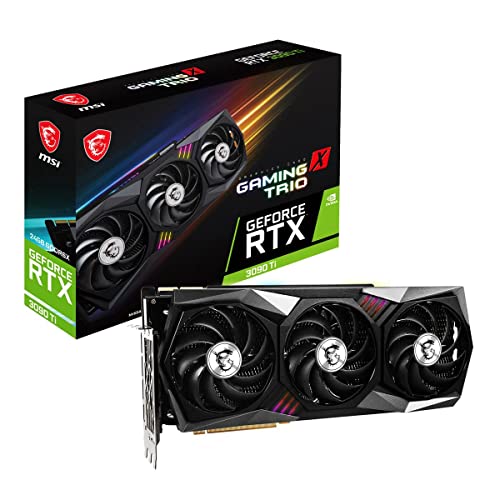
The MSI Gaming X Trio version of the RTX 3090 Ti features a 384-bit memory interface and 24GB of GDDR6X VRAM, optimized for bandwidth-intensive applications. Its Ampere architecture enhances performance and efficiency. This card is engineered for overclocking enthusiasts and gamers seeking sustained frame rates without thermal throttling. Pairing this GPU with a CPU that supports PCIe 4.0 ensures the best bandwidth and minimal bottleneck for intensive gaming or 3D rendering workloads.
MSI GeForce RTX 3090 Ti SUPRIM X 24G Gaming Graphics Card

MSI’s SUPRIM X variant boasts impressive thermal management with a sculpted exterior designed for optimal airflow. Its dual fan blades operate in pairs to create focused air pressure, ensuring the card remains cool and stable even under heavy load. This makes it a perfect match for CPUs that generate considerable heat during multitasking and gaming sessions. It supports a smooth gaming experience with minimal temperature-induced throttling.
ASUS TUF Gaming NVIDIA GeForce RTX 3090 Ti OC Edition

Equipped with 24GB GDDR6X memory, this ASUS TUF Gaming edition boosts performance with NVIDIA’s Ampere Streaming Multiprocessors, doubling FP32 throughput and increasing power efficiency. It includes dual ball fan bearings for prolonged durability and comes with GPU Tweak software to customize settings. The card supports major gaming innovations such as ray tracing and DLSS, which require a CPU with strong multi-threading abilities to maximize in-game performance.
Fasgear PCIe 5.0 GPU Power Cable Sleeved 70cm
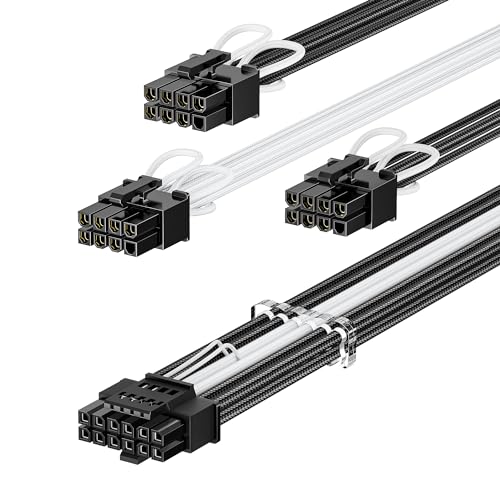
This specialized power cable addresses the demanding power requirements of the RTX 3090 Ti and newer GPUs like the RTX 4080 and 4090. Designed with a 16-pin (12+4) 12VHPWR connector, it provides a reliable connection from modular power supplies intended for brands like Corsair, Great Wall, and Thermaltake. Utilizing this cable ensures stable power delivery necessary to maintain peak GPU performance, especially when paired with high-end CPUs for gaming or creative workloads.
Buying Guide
Choosing the best CPU for the RTX 3090 Ti depends on several key considerations to maximize the potential of this high-end graphics card.
1. Avoiding Bottlenecks
The RTX 3090 Ti delivers extreme performance, thus pairing it with a CPU that can match its capability is crucial. High core counts and fast clock speeds are essential to prevent CPU bottlenecks, particularly in CPU-intensive games and applications. Look for recent-generation processors that support PCIe 4.0 or 5.0 to ensure optimal data transfer speeds.
2. Core Count and Threading
Modern games and multitasking workflows benefit greatly from multi-core CPUs with thread virtualization like Intel’s Hyper-Threading or AMD’s Simultaneous Multi-Threading (SMT). Selecting CPUs with at least 8 cores and 16 threads can future-proof your system and deliver smooth performance when running demanding software alongside gaming.
3. Clock Speed and Architecture
Higher clock speeds enable better frame rates in games, while architectural advancements enhance efficiency and instructions-per-clock (IPC). Intel’s 12th/13th gen and AMD’s Ryzen 5000/7000 series offer top-tier gaming and productivity performance. CPUs with high IPC and boost clocks will better complement the RTX 3090 Ti’s capabilities.
4. Cooling and Power Requirements
High-performance CPUs generate significant heat. Ensure your build includes adequate cooling solutions (liquid or high-quality air cooling) and a power supply capable of supporting both the CPU and the RTX 3090 Ti, which demands substantial wattage. Proper cooling prevents thermal throttling, maintaining consistent performance.
5. Compatibility and Future-Proofing
Check motherboard compatibility, socket type, and chipset features like PCIe version and memory support. Consider CPUs that not only maximize current performance but also enable upgrades down the line, making your investment sustainable.
6. Budget Constraints
While the RTX 3090 Ti is a premium component, balancing your budget to invest in a CPU that matches its performance is wise. Overspending on CPUs that provide marginal gains beyond a certain point might not be cost-effective. Prioritize CPUs that offer the best balance of performance per dollar.
By carefully considering these factors, you can select a CPU that unlocks the full power of the RTX 3090 Ti, ensuring a seamless, high-performance computing experience for gaming, content creation, and multitasking.