The Intel Core i7-12700K is a powerful 12-core processor designed for gamers and multitaskers seeking high performance. Cooling solutions for this CPU are crucial to maintain optimal speeds and avoid thermal throttling. This guide reviews top coolers compatible with the i7-12700K, from all-in-one liquid coolers to traditional heatsinks, helping you choose the best fit for your build. Below is a summary table of the selected products featured in this article.
| Product Name | Brand | Type | Compatibility |
|---|---|---|---|
| Cooler Master 240 Core II AIO CPU Liquid Cooler | Cooler Master | Liquid Cooler (240mm Radiator) | Intel LGA 1700/1851 | AMD AM5/AM4 |
| QUETTERLEE New Heatsink CPU Cooling Fan for Intel i7 | QUETTERLEE | Air Cooler (3.5-Inch Fan) | Intel LGA 115x series (1150, 1151, 1155, 1156) |
| Intel E97379-003 CPU Cooler with Aluminum Heatsink | Delta Electronix | Air Cooler (3.5-Inch 4-Pin Fan) | Intel i3/i5/i7 LGA 1150/1155/1156 |
| Intel Core i7-12700K Gaming Desktop Processor | Intel | Processor with Integrated Graphics | Compatible with Intel 600 & 700 series chipsets |
| INLAND Intel Core i7-12700K with MSI PRO Z790-P WiFi | INLAND | Processor & Motherboard Bundle | LGA 1700, DDR5, PCIe Gen 5 support |
Cooler Master 240 Core II AIO Liquid CPU Cooler

The Cooler Master 240 Core II AIO cooler offers an advanced water cooling solution optimized for high-end CPUs like the i7-12700K. Equipped with a patented G9R dual chamber pump, it enhances water pressure to focus cooling on the CPU hotspot. The infinity mirror design not only gives a visually appealing customizable RGB glow but also improves lighting diffusion. The 240mm radiator paired with dual MF120 Lite PWM fans ensures superior airflow and silent operation. This cooler supports Intel’s LGA 1700 socket and is also compatible with AMD AM5/AM4 platforms, making it versatile. The enhanced water flow and efficient heat dissipation help maintain lower temperatures under heavy gaming or multitasking workloads.
QUETTERLEE New Heatsink CPU Cooling Fan for Intel i7 Series
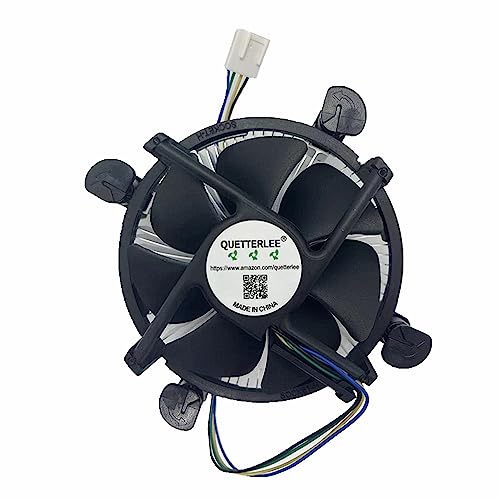
The QUETTERLEE heatsink and CPU cooling fan is a direct replacement cooler designed for Intel LGA 115x socket series, including multiple i3, i5, and i7 processors. Featuring a 3.5-inch 4-pin fan with 12V operation, it provides basic air cooling for processors operating within moderate thermal demands. Although intended primarily for older socket types, it can be a budget solution for builds with compatible sockets or as a backup cooler. Its aluminum heatsink combined with a four-pin PWM fan allows for effective heat dissipation and variable speed control according to system temperature.
Intel E97379-003 CPU Cooler with Aluminum Heatsink

The Intel E97379-003 cooler features a traditional combination of an aluminum heatsink with a 3.5-inch 4-pin PWM fan and is compatible with Intel socket 1150, 1155, and 1156 processors including many i7 models. This OEM-style cooler is known for stable airflow and effective heat dispersion in standard desktop builds. While it may not match high-performance liquid or large air coolers in thermal capacity, it presents a reliable cooling option for systems with factory or mild overclocked settings and ensures compatibility and quiet operation given its PWM fan control technology.
Intel Core i7-12700K Gaming Desktop Processor With Integrated Graphics

The Intel Core i7-12700K processor itself includes support for integrated graphics (Intel UHD 770) and is built for next-generation gaming with a hybrid architecture of performance and efficiency cores. While it does not come with a stock cooler, selecting a compatible cooling solution is critical due to the processor’s high 125W TDP and turbo boost frequency up to 5.0 GHz. Cooling performance directly impacts CPU longevity and peak performance, making pairing this processor with efficient coolers like Cooler Master’s liquid solutions or similarly capable devices essential.
INLAND Intel Core i7-12700K with MSI PRO Z790-P WiFi Motherboard Bundle

The INLAND Intel Core i7-12700K with MSI PRO Z790-P WiFi motherboard bundle features a powerhouse processor paired with a reliable motherboard supporting DDR5 memory, PCIe Gen 5, and LGA 1700 socket. While this package highlights components for performance builds, effective cooling is paramount when utilizing this CPU’s full potential. The motherboard offers sufficient power phases and connectivity options, but selecting an optimized cooling system—particularly an advanced air or AIO liquid cooler—is recommended to fully harness its turbo frequencies and maintain system stability under intensive gaming or content creation workloads.
Buying Guide: How to Choose the Best Cooler for Intel Core i7-12700K
Choosing the right cooler for the i7-12700K depends on several important criteria. Careful consideration ensures your CPU remains cool under load, preserving performance and longevity.
Socket Compatibility and Mounting
Ensure the cooler supports the LGA 1700 socket used by the i7-12700K. Many coolers designed for older sockets require updated mounting brackets. Verify compatibility to avoid installation issues.
Cooling Method: Air vs. Liquid
- Air Coolers: Typically easier to install, quieter, and less expensive. Suitable for moderate use and mild overclocking.
- Liquid/AIO Coolers: Provide superior cooling performance for overclocking and intensive workloads. Larger radiators (240mm or above) help dissipate more heat but require sufficient case space and maintenance.
Thermal Design Power (TDP) Rating
The i7-12700K has a TDP of 125W with potential spikes when turbo-boosted. Select a cooler rated to handle this thermal output to prevent overheating and throttling. High-performance coolers typically support CPUs beyond 150W TDP, providing extra headroom.
Noise Levels
Consider fans with PWM (pulse-width modulation) control that adjusts speed based on load, helping minimize noise during idle or light use while ramping up when needed.
Size and Clearance
Check your PC case dimensions to ensure the cooler fits, especially for large air coolers or liquid cooler radiators. Remember to account for RAM height and motherboard heatsinks that may interfere with cooler installation.
Aesthetics and Features
RGB lighting and customizable LEDs can enhance your build’s look. Infinity mirror designs and ARGB fans offer vibrant visual effects that may appeal to gaming setups.
Price and Warranty
Balance your budget with desired performance. Extended warranties and customer support lines add value, especially when investing in premium cooling systems.
Additional Considerations
- Maintenance: Liquid coolers may require occasional refilling or pump checks, while air coolers mostly need dust cleaning.
- Installation Complexity: Some liquid coolers have more complex mounting and tubing routes compared to simple air coolers.
- Future Upgradability: Modular mounting kits or universal fittings increase compatibility with future CPUs and motherboards.
By evaluating these factors in line with your usage scenario—gaming, content creation, or general multitasking—you can select a cooler that ensures your Intel Core i7-12700K runs efficiently and reliably.