Choosing the right computer for graduate studies involves balancing processing power, portability, battery life, and value. The following selections showcase a mix of budget-friendly laptops and study aids that can streamline research, writing, and collaboration. Each option is evaluated for multitasking, note-taking, streaming, and on-the-go use to support rigorous academic workloads.
Summary of chosen products:
| Product | Brand | Key Benefit |
|---|---|---|
| ASUS Vivobook Go 15.6” | ASUS | Balanced performance with Ryzen 3 and 8GB RAM for everyday grad school tasks |
| School Zone Math War Cards | School Zone | Supplemental learning tool for quick math drills or study breaks |
| HP Chromebook 14 | HP | Lightweight, long battery life for cloud-based coursework |
| Everything You Need to Ace Math in One Big Fat Notebook | Workman | Comprehensive reference for math topics common across programs |
| All-in-one Combination | Various | Extra resource for math fundamentals and study strategies |
ASUS Vivobook Go 15.6” FHD Laptop

The ASUS Vivobook Go 15.6” combines a 15.6-inch FHD display with a practical Ryzen 3 7320U quad-core processor and 8GB DDR5 RAM. The 256GB SSD provides snappy boot times and enough space for essential software, documents, and course materials. Integrated AMD Radeon Graphics support everyday tasks such as word processing, research, and streaming. Windows 11 Home delivers current productivity features, and the device’s durability helps withstand college life. This configuration supports multitasking across document editors, web research, and light media editing—useful for graduate assignments and presentations.
Math War Cards: Addition & Subtraction

While not a computing device, the School Zone Math War cards offer a quick, engaging way to reinforce basic arithmetic during study breaks. For graduate students, these cards can serve as a low-stress tool for math warmups or review sessions with peers, helping maintain mental agility between research tasks. The gameplay encourages focus and problem-solving, which can complement the more intensive study demands of grad programs when used in short, structured blocks.
HP Chromebook 14 Laptop
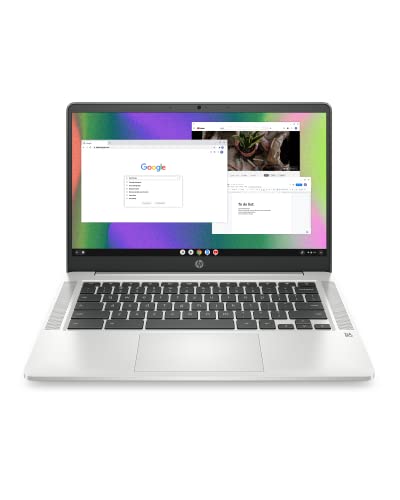
The HP Chromebook 14 offers portability with a 14-inch display and lightweight design. Powered by an Intel Celeron N4120, it emphasizes battery life and cloud-based workflows, which can be ideal for students who primarily work with Google Drive, Office Online, or other web-based tools. The 64GB eMMC storage is modest, so this model excels for users who primarily access data in the cloud and prefer a simple, durable device for note-taking, writing, and email. It’s a practical secondary device for research, group projects, and lightweight coursework.
Everything You Need to Ace Math in One Big Fat Notebook

This middle-school math guide provides a broad reference on essential topics, including algebra, geometry, and statistics—materials that frequently recur across graduate disciplines. While not a substitute for college-level math, it serves as a concise refresher and a handy study companion for students who want quick explanations, tips, and practice problems to reinforce foundational concepts. It can support coursework requiring quantitative methods, data interpretation, or basic statistical understanding.
Buying Guide: Key Purchase Considerations
Choosing a graduate school computer requires weighing performance, portability, and software compatibility. Consider the following perspectives to guide a practical decision:
- Processing power: If your programs involve data analysis, coding, or simulations, prioritize a multi-core CPU and at least 8GB of RAM. SSD storage improves boot times and file access.
- Portability and battery life: For students who travel between campus buildings, libraries, and classrooms, a lighter laptop with all-day battery life reduces the need for constant charging.
- Display quality: A comfortable screen size (13-15 inches) with good brightness and color accuracy enhances reading long documents and reviewing research papers.
- Operating system and software: Ensure compatibility with the university’s required software and VPNs. Windows 11 and Chrome OS cover most academic workflows, but some programs may demand macOS.
- Durability and warranty: Physical durability matters in campus life. Look for military-grade or reinforced builds and a clear warranty/tech support policy.
- Cloud and offline balance: If you rely heavily on cloud services, prioritize reliable wireless connectivity and optional offline storage for offline work during commutes.
- Budget considerations: For grad students, balancing performance with cost is key. Consider whether a dedicated GPU or extra RAM justifies the price based on your field.
How to choose for your field
Research-heavy programs, such as engineering or data science, may benefit from faster CPUs, more RAM, and larger displays. Literature-focused tracks can prioritize portability and battery life. For collaborative work, ensure the device supports reliable web conferencing, document editing, and secure file sharing. The right mix depends on your coursework, lab requirements, and travel patterns, so compare configurations against your anticipated workload.
Software and accessories considerations
Beyond the base device, consider essential accessories: a reliable external hard drive or cloud backup plan, a good wireless mouse for extended writing sessions, a protective sleeve for campus travel, and a robust VPN-compatible setup for secure remote access. If your program uses specialized software, confirm compatibility and installation options before purchasing.