The right cable modem and router combo can simplify your setup, improve Wi-Fi coverage, and reduce monthly rental fees. Below are five top options that balance speed, reliability, and ease of use for American homes. Each product highlights DOCSIS 3.1 or 3.0 capabilities, Wi‑Fi technology, and compatibility with major providers like Xfinity, Spectrum, and Cox.
| Product | Provider Compatibility | Wi‑Fi Tech | Max Speed |
|---|---|---|---|
| NETGEAR Nighthawk CAX30 | Xfinity, Spectrum, Cox | WiFi 6 AX2700 | Up to 2.7 Gbps |
| NETGEAR C7000 (Renewed) | Xfinity, Cox | WiFi AC1900 | Up to 800 Mbps |
| NETGEAR Nighthawk AX2700 CAX30-100NAR (Renewed) | Xfinity, Spectrum, Cox | WiFi 6 AX2700 | Up to 2.7 Gbps |
| ARRIS G18 | Comcast Xfinity, Cox, Spectrum | WiFi 6 AX1800 | Multi-Gigabit |
| Motorola MG8702 | Comcast Xfinity, Cox, Charter Spectrum | AC3200 with Power Boost | High speed DOCSIS 3.1 |
NETGEAR Nighthawk Modem Router Combo CAX30

The NETGEAR Nighthawk CAX30 combines a DOCSIS 3.1 cable modem with a Wi-Fi 6 router to deliver high-speed, reliable internet for busy households. It supports major cable providers like Xfinity, Spectrum, and Cox, while not being compatible with Verizon, AT&T, CenturyLink, or DSL services. The device covers up to 2,000 square feet and supports up to 25 concurrent devices. It includes four 1-Gig Ethernet ports and a USB 3.0 port for wired devices, gaming consoles, and storage accessories. This model is ideal for homes with multiple streaming devices and smart home gadgets that demand stable wireless performance.
Key considerations: Wi-Fi 6, AX2700 performance, robust coverage up to 2,000 sq ft, compatibility with several major providers, and port aggregation support via Ethernet.
Netgear C7000 Cable Modem Router Combo (Renewed)

The Netgear C7000 delivers an all-in-one solution for households seeking simplicity and cost savings. With DOCSIS 3.0 and a built-in AC1900 Wi-Fi router, it is suitable for cable plans up to 800 Mbps and supports typical streaming and online gaming. While performance may be lower than DOCSIS 3.1 models at very high speeds, the C7000 remains a practical option for smaller homes or users who want to avoid renting equipment. It’s compatible with major providers like Xfinity and Cox, and its renovational status often comes with additional value.
Key considerations: DOCSIS 3.0, AC1900 wireless, best for up to 800 Mbps plans, renewed pricing, and provider compatibility.
NETGEAR Nighthawk AX2700 CAX30-100NAR (Renewed)

This renewed unit offers Wi‑Fi 6 performance with AX2700 speeds, suitable for households with many connected devices. It remains compatible with major cable providers like Xfinity, Spectrum, and Cox, and covers substantial space while maintaining multiple wired connections via Ethernet and USB 3.0. The renewed option can be a budget-friendly path to modern speeds for users who want to upgrade from older equipment without paying full price.
Key considerations: Renewed status, Wi‑Fi 6 technology, wide provider compatibility, and strong device capacity.
ARRIS G18 Cable Modem Router Combo

The ARRIS G18 is designed to deliver fast, reliable performance with DOCSIS 3.1 and a built-in Wi‑Fi 6 router. It aims to support multi-gigabit speeds and robust coverage for larger homes or households with multiple users. ARRIS is a well-known name in home networking, and the G18 is positioned as a ready-to-use solution for households seeking straightforward setup and strong wireless reach across multiple rooms.
Key considerations: DOCSIS 3.1, Wi‑Fi 6, strong coverage, and broad compatibility with major providers.
Motorola MG8702 DOCSIS 3.1 Cable Modem + Wi-Fi Router
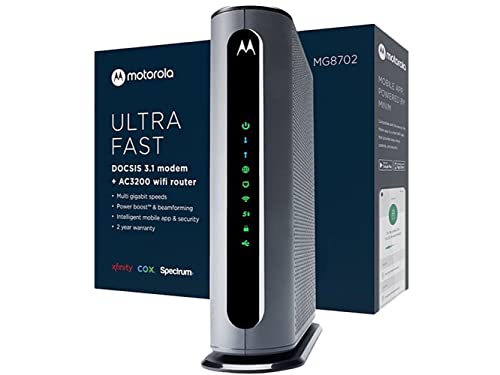
The Motorola MG8702 combines a DOCSIS 3.1 modem with a high-performance AC3200 Wi-Fi router. It features Power Boost, Range Boost, and AnyBeam beamforming to deliver fast wireless speeds and wide coverage. It is approved for major providers like Comcast Xfinity, Cox, and Charter Spectrum, making it a solid option for households that need reliable streaming and gaming without separate devices. The integrated system helps reduce equipment clutter while maintaining strong network performance.
Key considerations: DOCSIS 3.1, AC3200, built-in beamforming, and provider approvals for major networks.
Buying Guide: Key Purchase Considerations For Cable Modem And Router Combos
- Compatibility: Verify provider compatibility (Xfinity, Spectrum, Cox, etc.) and check if your service requires a modem with specific DOCSIS support or voice compatibility.
- DOCSIS Standard: DOCSIS 3.1 supports higher speeds and better efficiency than DOCSIS 3.0. If you subscribe to gigabit plans, prioritize DOCSIS 3.1 devices.
- Wi‑Fi Technology: Choose Wi‑Fi 6 (802.11ax) for better performance in crowded households and with many smart devices. Wi‑Fi 5 (AC) is still viable for smaller spaces or budget constraints.
- Coverage Area: Consider the size of your home. Larger homes may require devices with broader coverage (2,000–2,500 sq ft or more) or a unit that supports mesh-like range through multiple devices.
- Ethernet Ports: Look for multiple Gigabit Ethernet ports and USB ports for wired devices, gaming consoles, and NAS storage. Port aggregation can improve throughput in some setups.
- Future-Proofing and Renewal: Renewed devices can offer significant savings but may carry shorter warranties. Weigh renewal status against long-term reliability and return policies.
- Ease of Setup: All-in-one modem/router combos simplify installation and reduce cable clutter. Check manufacturer app support for network management and troubleshooting.
- Security and Updates: Ensure the device receives regular firmware updates to protect against vulnerabilities and improve performance over time.
- Rentals vs. Ownership: Owning a modem/router eliminates monthly rental fees. Compare total ownership cost against ongoing rental costs to determine long-term savings.
- Media and Gaming Demands: If you have 4K streaming, online gaming, or video conferencing, prioritize devices with robust QoS features and high concurrent device support.
These selections provide a range of speeds, coverage, and price points. When choosing, align the device’s capabilities with your internet plan, home size, and the number of connected devices to balance performance and value.