Finding the right Apple TV controller is essential for easy navigation, voice commands, and smooth streaming. Below is a summary table of top Apple TV controllers available on Amazon, featuring original Apple remotes and reliable replacements from third-party brands.
| Product | Brand | Key Features |
|---|---|---|
| Apple TV Siri Remote (3rd Generation) | Apple | Touch-enabled clickpad, circular gesture control, Siri voice commands |
| Replacement for Apple-TV-4K-Remote (Non-Siri) | LOUTOC | Compatible with multiple Apple TV models, no voice, IR remote |
| Remote Control for Apple TV Siri 4K 4th EMC 3186 | BestParts | Compatible with Apple TV 4K (1st gen) and Apple TV HD, no Siri voice |
| Apple TV Remote (2nd and 3rd Generation) | Apple | Sleek aluminum design, controls Mac/iPod/iPhone, basic controls |
| Replacement Remote for Apple TV 4K with TV Control | Nettech | Universal IR remote, TV control functions, no voice or touchpad |
Apple TV Siri Remote (3rd Generation)
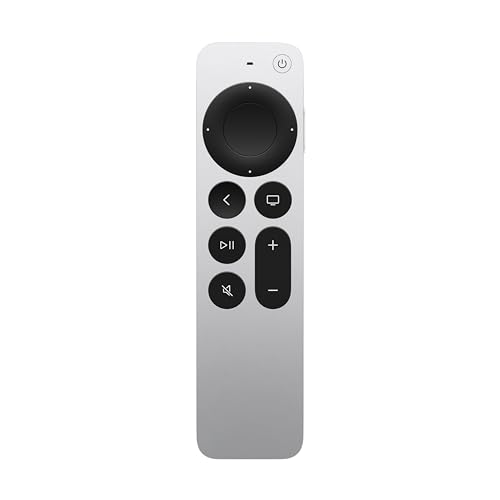
The Apple TV Siri Remote (3rd Generation) offers precise control over your Apple TV 4K. It features a touch-enabled clickpad allowing you to select titles easily, swipe through playlists, and navigate with a circular gesture on the outer ring for quick scene selection. Most notably, the integrated Siri voice assistant lets you find content quickly using voice commands. This remote merges sleek design with intuitive control, maintaining compatibility with the latest Apple TV models.
Replacement for Apple-TV-4K-Remote (Without Siri)

This LOUTOC replacement remote caters to Apple TV 4K, HD, and earlier models without Siri or voice features. It’s an IR remote requiring line-of-sight and includes power, volume, and mute buttons compatible with many TV brands like Samsung, LG, and Sony. Note that you must “unlock” the previous remote before using this device. This remote replaces several Apple TV generations, making it a versatile choice for users needing a non-Siri alternative.
Remote Control for Apple TV Siri 4K (4th Gen)

The BestParts remote is a compatible replacement for the Apple TV Siri Remote 1st generation for Apple TV 4K (A1842) and Apple TV HD (A1625). It lacks voice or touchpad features but provides essential navigation functions. It is incompatible with Apple TV 2nd or 3rd generation but suits users seeking basic operation without Siri integration.
Apple TV Remote for 2nd and 3rd Generation
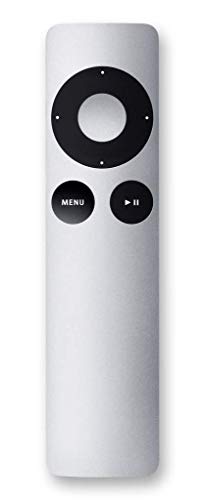
This original Apple Remote works with Apple TV 2nd and 3rd-generation models, featuring a sleek aluminum design. It can also control Mac, iPod, or iPhone devices from a distance. Users benefit from basic functions like play, pause, volume adjustments, forward, back, and menu navigation, making it a straightforward tool for older Apple TV systems.
Replacement Remote for Apple TV 4K with TV Control

The Nettech replacement remote supports Apple TV 4K and various generations as a universal IR remote. It features TV control functions such as power, volume, and mute but lacks Siri voice and touchpad capabilities. This remote is ideal for users who want basic functionality with broad device compatibility. It requires line-of-sight use and fresh batteries for quick setup.
Buying Guide for Apple TV Controllers
Compatibility
Ensure the remote control matches your Apple TV generation. The latest models like Apple TV 4K (3rd generation) require updated remotes with Bluetooth and Siri integration, while earlier generations may work with IR remotes or older Apple remotes.
Voice Control and Siri Integration
If you prefer voice commands to search content or control media, opt for remotes explicitly supporting Siri, such as Apple’s own Siri Remote. Non-Siri remotes lack this feature but often work well for basic navigation.
Connectivity Type
Apple TV remotes typically use Bluetooth for seamless functionality and no line-of-sight restrictions. Replacement remotes often use IR signals requiring direct line-of-sight to the TV or Apple TV device, which could limit convenience.
Additional TV Control Functions
Some replacement remotes include TV control buttons for power, volume, and mute, compatible with various TV brands. This is useful if you want to control multiple devices with one remote.
Design and Navigation Features
Consider a remote’s physical design for ease of use, including touchpads, circular gesture controls, or button layouts. Apple’s Siri Remote offers a touch-enabled clickpad and precise gesture controls, while replacements may have simpler button designs.
Battery Life and Setup
Most remotes use rechargeable batteries or standard replaceable batteries. Check setup requirements; many replacements require no programming and work immediately after inserting batteries, while original Apple remotes pair via Bluetooth automatically.
Price and Brand Reliability
Apple remotes provide official support and guaranteed compatibility but at a higher cost. Third-party remotes are budget-friendly but may lack features or require additional setup. Check customer reviews and brand reputation before purchasing.