Finding the perfect Android tablet for note taking means balancing features like stylus support, screen clarity, performance, and portability. Below is a summary of the top tablets tailored to students, professionals, and creatives who want efficient digital note taking along with strong performance for multimedia and productivity.
| Tablet | Screen Size | Storage | Stylus Included | Key Features |
|---|---|---|---|---|
| Samsung Galaxy Tab S6 Lite (2025) | 10.4″ | 64GB | Yes (S Pen) | Dolby Atmos, long battery life, lightweight design |
| Samsung Galaxy Tab S6 Lite 128GB | 10.4″ | 128GB + Expandable | Yes (S Pen) | Exynos 1280 processor, PC-like productivity with DeX |
| Samsung Galaxy Tab S10 FE+ 13.1″ | 13.1″ | 256GB | Yes (S Pen) | IP68 water-resistant, Handwriting Assist, large display |
| XPPen Color Digital Notebook 10.95″ | 10.95″ | 6+128GB | Yes (Battery-Free X3 Pro Pencil) | 3 color modes, anti-glare display, 90Hz refresh rate |
| Callsky-Tab Android Tablet 10.1″ | 10.1″ | 64GB + Expandable | No | 12GB RAM, WiFi 6, Octa-core CPU, dual speakers |
Samsung Galaxy Tab S6 Lite (2025) for Enhanced Note-Taking

The Galaxy Tab S6 Lite (2025) by Samsung upgrades the note-taking experience with its included S Pen that offers precise writing for notes, photo editing, and document markup. The 10.4-inch crystal-clear display complements Dolby Atmos surround sound for immersive multimedia use.
Its lightweight design and slim form factor make it highly portable for students and professionals alike. With practical features like expandable storage and a modern stylus input, it is well-suited for classroom, office, or casual creative tasks.
Samsung Galaxy Tab S6 Lite 128GB Model With PC-Like Features

The Samsung Galaxy Tab S6 Lite with 128GB storage enhances productivity with a fast Exynos 1280 processor and a powerful S Pen stylus. Its thin, ultra-light design supports all-day use backed by a 14-hour battery life and fast charging technology.
The tablet runs Samsung DeX, enabling a desktop-like experience by connecting a keyboard or external display, ideal for seamless multitasking and note organization, making it a solid choice for both work and artistic creativity.
Samsung Galaxy Tab S10 FE+ 13.1” With Large Display & Water Resistance
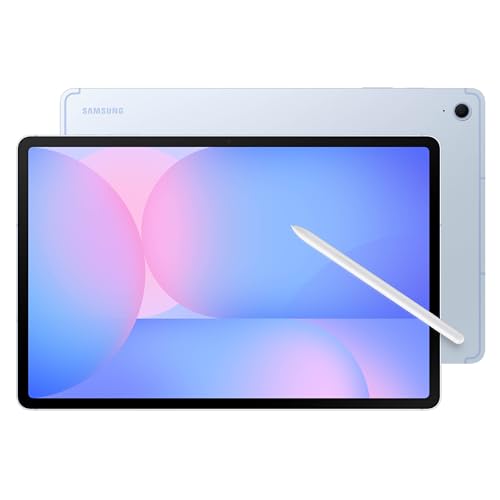
This Samsung Galaxy Tab S10 FE+ features a spacious 13.1-inch screen that benefits note takers needing extra visual workspace. Its IP68 water resistance adds durability for daily use, while the S Pen supports precise handwriting and drawing.
Distinct tools like Handwriting Assist help tidy handwriting by straightening and spacing, enhancing the legibility of digital notes. The dual speakers also provide immersive sound perfect for multimedia breaks between note sessions.
XPPen 3-in-1 Color Digital Notebook for Paper-Like Note Taking

The XPPen 10.95″ digital notebook combines convenience and versatility by offering three color modes—Monochrome, Light Color, and Nature Color—activated with the X-paper key. Its AG nano-etched LCD minimises glare, simulating a natural paper writing feel.
Boasting a 90Hz refresh rate and battery-free X3 Pro stylus, this tablet ensures a smooth, lag-free note-taking and sketching experience. Ideal for those who value a realistic writing feel with advanced screen technology.
Callsky-Tab 10.1″ Android Tablet With High RAM for Multitasking

The Callsky-Tab features powerful internals with 12GB RAM and an Octa-core processor, tailored for smooth multitasking, including running note-taking apps alongside other productivity tools. Its 10.1-inch IPS display delivers vivid visuals at 800×1280 resolution.
This tablet supports WiFi 6 and Bluetooth, improving connectivity speed and reliability. Dual speakers add quality sound output, enhancing video conferencing or multimedia consumption during study breaks. Although it lacks a dedicated stylus, its high RAM and processor allow efficient app performance.
Buying Guide: Key Considerations for Choosing an Android Tablet for Note Taking
When selecting an Android tablet to optimize note taking, consider these essential factors:
- Stylus Support & Responsiveness: Tablets with included styluses, like Samsung’s S Pen or XP-Pen’s battery-free pencil, deliver the best note-taking precision. Low latency and pressure sensitivity enhance handwriting naturalness.
- Screen Quality & Size: A clear, anti-glare display with adequate size (typically 10” or more) contributes to comfortable long sessions of writing or drawing. Higher resolutions improve detail visibility.
- Performance (CPU & RAM): Smooth multitasking is vital for managing notes, PDFs, and other apps simultaneously; aim for at least 4GB RAM and a capable octa-core processor or better.
- Storage & Expandability: Ample internal storage (minimum 64GB) plus microSD expansion allow storing notes, multimedia, and apps without restrictions.
- Battery Life: Long battery life ensures all-day use without frequent recharging, critical for students and professionals on the go.
- Software Features: Extras like Samsung DeX for desktop experience or handwriting assistive apps streamline workflow. Consider if the tablet runs the latest Android version for app compatibility and improved security.
- Portability & Build Quality: Lightweight and slim designs make tablets easier to carry. Water resistance and durable materials add longevity under daily use conditions.
- Audio & Connectivity: Good speakers and modern connectivity (WiFi 6, Bluetooth 5.0) contribute to enhanced video calls and media experiences, helping maintain focus during study breaks.
These angles combined will help you choose a tablet that not only supports note taking efficiently but serves well across entertainment, productivity, and creative tasks.