Discover a curated selection of reliable all-in-one printers that cover print, scan, copy, and more for home offices and small teams. The following models blend convenience, connectivity, and efficiency, with features like duplex printing, automatic document feeders, and AI-enhanced printing to streamline daily tasks. Each entry includes a quick snapshot and why it matters for a modern workspace. This guide also explains how to choose the right all-in-one based on volume, wireless needs, and budget.
| Product | Brand | Key Benefit | Best For |
|---|---|---|---|
| HP OfficeJet Pro 8125e | HP | AI-enabled printing with reliable home-office performance | Small teams and frequent color printing |
| Brother MFC-J1360DW | Brother | Automatic duplex and cloud app connectivity | Home offices needing speed and cloud workflow |
| HP DeskJet 2855e | HP | AI-assisted outputs with compact design | Starter home use and simple multitasking |
| HP LaserJet Pro MFP 3101sdw | HP | Fast monochrome performance for documents | Small teams focused on text-heavy work |
| HP Smart Tank 5101 | HP | High-volume ink savings with included ink | Heavy color printing and long runtimes |
Note: Each product listing includes a direct link to the Amazon product page for quick access. The summarized features below reflect the most relevant capabilities for home offices and small workplaces seeking dependable all-in-one performance.
HP OfficeJet Pro 8125e: All‑In‑One Powerhouse

The HP OfficeJet Pro 8125e delivers robust color-printing performance with a focus on home-office reliability. It supports printing, scanning, copying, and fax needs, with a built-in auto-document feeder for multi-page tasks. AI-enabled features help optimize layouts and content, ensuring professional-looking documents straight from home. The printer is designed to handle common home-office workflows—whether you’re printing client-ready materials or school projects—from a comfortable seating position with the best-in-class print app for easy control from mobile devices.
Key considerations include print speed for color documents, the efficiency of HP’s Instant Ink ecosystem, and the ability to handle duplex printing. The model fits well in busy home offices that require consistent color output and seamless app connectivity for mobile and desktop tasks. With a balance of speed, quality, and smart features, it’s suited for users who frequently print presentations, reports, and marketing materials from home.
Brother MFC-J1360DW: Cloud-Ready, Duplex Printing

The Brother Work Smart MFC-J1360DW emphasizes practical all-in-one capabilities with automatic duplex printing and a user-friendly 1.8” color display. This model is designed for home and small office use, offering print, copy, and scan functionality in a compact footprint. It also supports cloud app connections, enabling direct printing from popular services like Google Drive, Dropbox, Box, and OneDrive. The printer aims to deliver reliable everyday performance with affordable running costs through compatible LC501 ink packs.
Consider its productivity features: automatic two-sided printing, a 20-sheet single-sided ADF, and a 150-sheet paper tray. Speeds reach up to 16 ppm black and 9 ppm color, making it suitable for mixed-document tasks and frequent scanning needs. It’s a practical choice for households that rely on cloud storage and mobile printing along with standard documents and forms in color or black-and-white.
HP DeskJet 2855e: Simple, AI-Enhanced Everyday Printing

The HP DeskJet 2855e provides a compact all-in-one solution for light, everyday home printing. Its color printing capabilities, autoframes for scanning, and a straightforward interface support typical household tasks—from school assignments to DIY recipe cards. The model includes a 60-sheet input tray and supports AI features that optimize page layouts, reducing waste and improving readability. This device is ideal for households prioritizing ease of use and affordable maintenance for casual printing needs.
While not designed for high-volume output, the DeskJet 2855e is well-suited for families that print occasional documents, color photos, and forms. It’s also a solid choice for those who want wireless printing and scanning without complex setup. The balance of compact size, essential functions, and AI-assisted formatting makes it a sensible entry point into home-office printing ecosystems.
HP LaserJet Pro MFP 3101sdw: Fast Monochrome For Teams

The HP LaserJet Pro MFP 3101sdw is a laser-based all-in-one designed for small teams that prioritize sharp black-and-white documents. With speeds up to 35 ppm in monochrome, this model excels at producing professional reports and forms quickly. It supports duplex printing, a 250-sheet input tray, and a 50-sheet auto document feeder, boosting productivity in document-heavy workflows. Scanning and copying capabilities are integrated to streamline document management without sacrificing speed.
For offices handling a lot of textual output, the LaserJet Pro 3101sdw offers efficient paper handling and consistent toner-based results. While it lacks the vibrant color emphasis of inkjet models, it’s a dependable choice for day-to-day business documents, memos, and client handouts, especially when color is not a primary requirement. Connection options support modern office networks and mobile printing needs, enabling flexible work methods.
HP Smart Tank 5101: High-Volume Color Printing
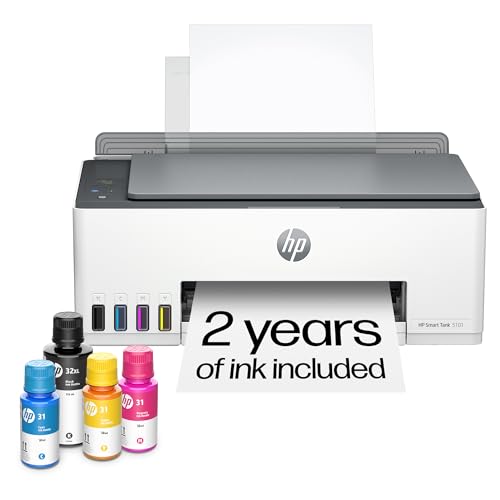
The HP Smart Tank 5101 targets high-volume color printing with its refillable ink tanks and included ink supply. This model is designed for families or small offices that print large quantities of color documents, photos, or marketing materials. The printer supports print, scan, and copy functions, and it offers wireless connectivity with self-healing Wi-Fi for stable operation. The “2 years of ink” included setup helps reduce running costs, making it a strong option for those who print frequently in color and want predictable expenses over time.
Considerations include ink management, reprint rates for color pages, and the ease of replenishing ink tanks. For users who need long print runs without frequent cartridge changes, the Smart Tank 5101 provides a compelling balance of capacity and convenience. It’s ideal for households and small offices that value savings on color printing and straightforward maintenance.
Buying Guide: Key Purchase Considerations And Comparisons
- Printing needs: If you do a lot of color graphics or marketing materials, inkjet models with AI features (like the HP DeskJet 2855e or OfficeJet Pro 8125e) can deliver better color quality and flexible photo printing. For heavy text documents, a monochrome laser model (like the HP LaserJet Pro MFP 3101sdw) offers faster output and typically lower cost per page.
- Volume and ink management: High-volume households or small offices benefit from printers with large ink capacities or refillable ink tanks (HP Smart Tank 5101). Consider total cost of ownership, including ink replacement frequency and price per page.
- Duplex and media handling: Automatic duplex printing saves paper and time. Look for models with reliable duplex, ADF capacity for multi-page scans, and a suitable paper tray size to match typical workloads.
- Connectivity and ecosystem: Cloud printing, mobile apps, and compatibility with Google Drive, OneDrive, and other services simplify workflows. If you rely on cloud storage, prioritize printers with easy cloud integration and secure wireless networking.
- Footprint and placement: For smaller spaces, compact models or all-in-one devices with a smaller footprint can fit on a desk or shelf. If you need a larger tray for letter or legal-size documents, verify tray depths and extension capacity.
- Software and AI features: AI-driven layout optimization and content removal can reduce waste and improve readability. These features are helpful for owners who print a lot of web pages, emails, or forms with inconsistent formatting.
- Future-proofing: Consider models with ongoing firmware updates and compatibility with current mobile ecosystems to avoid early obsolescence as devices and apps evolve.