Choosing an air mouse remote blends precise motion control with keyboard convenience, enabling effortless navigation on Android TV boxes, smart TVs, projectors, and PCs. This guide highlights five top options, detailing how they combine air-gesture control, infrared learning, and compact keyboards to simplify entertainment and productivity setups. Each picks emphasizes reliability, compatibility, and ease of use to help you select the right remote for your devices.
| Product | Brand | Key Features |
|---|---|---|
| Air Mouse Remote MX3 Pro | KUNSI | 2.4G wireless, 6-axis motion sensor, IR learning |
| DINOSTRIKE Wireless Presenter Remote | DINOSTRIKE | Air mouse, presenter controls, long range |
| Air Mouse With Voice (Miritz) | Miritz | Air mouse, 6-axis gyroscope, IR learning, full keyboard |
| iPazzPort Mini Air Mouse Keyboard | iPazzPort | Bluetooth & 2.4GHz dual mode, backlit keyboard |
| WeChip W1 Universal Air Mouse | WeChip | 2.4GHz RF, mini keyboard, 4-axis motion |
KUNSI Air Mouse Remote MX3 Pro

The MX3 Pro from KUNSI offers a compact air-mouse experience paired with a 2.4G wireless connection for plug-and-play setup. Its built-in motion sensor supports cursor control via gestures, enabling smooth navigation on Android TV boxes and smart TVs. An infrared learning feature allows programming of up to five keys, letting you emulate TV remote functions to control multiple devices with a single handheld. This model is ideal for users who want quick setup, minimal drivers, and flexible control across several devices without swapping remotes.
DINOSTRIKE Wireless Presenter Remote With Air Mouse

DINOSTRIKE combines presenter functionality with air-mouse capabilities, supporting Windows, Mac OS, Linux, and Android environments. Features include page navigation, volume control, and hyperlink operations, making it suitable for presentations as well as media navigation. The device offers a long wireless range (up to 164 feet for control, 82 feet for air-mouse use) and a built-in rechargeable battery. Its versatility makes it a strong pick for classrooms, conference rooms, and home theater setups where both presentation and navigation are needed.
Miritz Air Mouse With Voice

The Miritz air mouse blends a voice-enabled experience with a gyro-sensing remote. Its 6-axis gyroscope supports precise cursor control in mid-air, and the included full-function mini keyboard eases typing across apps and browsing. Infrared learning enables replicating your TV remote codes, simplifying remote management for smart TVs, Android TV boxes, and projectors. It’s positioned as a versatile option for users who want hands-free navigation alongside standard keyboard input.
iPazzPort Mini Air Mouse Keyboard
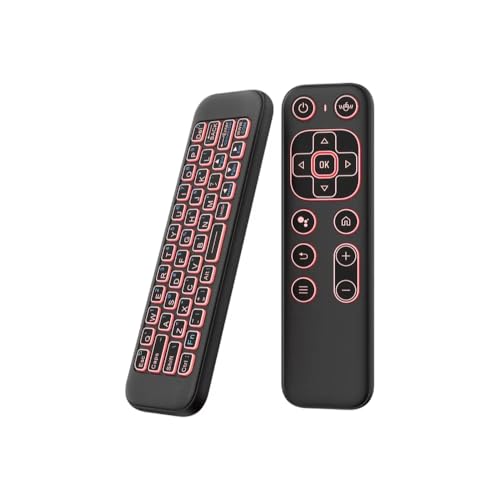
The iPazzPort combines Bluetooth and 2.4GHz dual-mode connectivity with a compact air-mouse keyboard design. Its 6-axis gyroscope supports precise navigation, and the backlit keyboard improves night usability. This model is widely compatible with Android TV boxes, PCs, laptops, and projectors, offering a single device solution for couch browsing, gaming, and light productivity. It’s especially appealing for users seeking a versatile remote that can replace multiple input devices.
WeChip W1 Universal Air Mouse
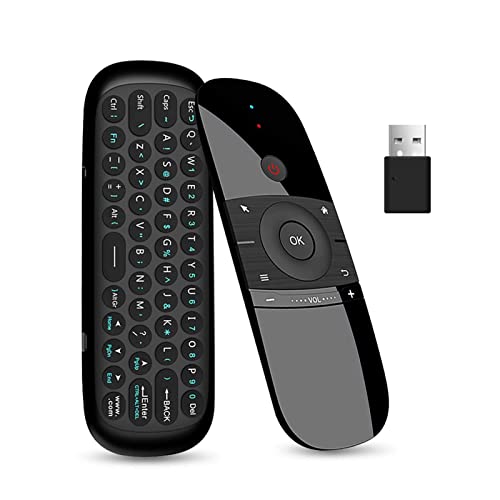
The WeChip W1 emphasizes plug-and-play convenience with 2.4GHz RF technology and a 10-meter range. It combines a mini wireless keyboard with a four-axis motion system in a compact 45-key layout. It supports Windows, Android, Mac OS, and Linux, and claims broad compatibility with Android TV boxes, HTPCs, and smart TVs that use USB receivers. Note that some larger brand TVs or streaming devices may have limited support, so compatibility testing is advised before purchase.
Buying Guide: Key Purchase Considerations
When selecting an air mouse remote, consider how you will use it most often, as this shapes the ideal feature set.
- Connectivity: Choose between 2.4GHz RF for plug-and-play reliability or Bluetooth for broader device compatibility. Some models offer both for flexibility.
- Motion Control: Look for a reliable 6-axis gyroscope or higher accuracy sensors for precise cursor movement, especially for presentations or desktop navigation.
- IR Learning: If you want to replace multiple remotes, IR learning helps emulate a TV or set-top box remote, consolidating control.
- Keyboard Type: Full or mini QWERTY keyboards affect typing speed. Backlit keys improve use in dark rooms.
- Operating System Compatibility: Ensure the remote supports your ecosystem (Android TV, Windows, macOS, Linux, etc.). Some remotes are not compatible with certain brands.
- Battery and Power: Rechargeable batteries are convenient; consider expected usage and whether a sleep mode helps save power during long sessions.
- Device Range: For large living rooms or classrooms, longer control ranges (80–164 feet) can be beneficial. Check real-world performance in reviews.
- Ergonomics and Weight: A comfortable grip and manageable weight reduce fatigue during extended use.
- Price and Support: Compare warranties, spare parts, and update support, especially for devices intended to replace multiple remotes.
Across the sample, air-mouse remotes provide a blend of motion-based control, keyboard input, and IR learning. For home theaters, prioritizing a stable 2.4GHz connection with IR learning can simplify device control. For productivity or classroom use, a model with a longer range and a bright backlit keyboard offers tangible benefits. Always verify compatibility with your primary devices before purchasing.