When shopping for a compact, high-quality display, a 24 inch IPS monitor often hits the sweet spot between desk space and immersive clarity. These models typically deliver wide viewing angles, accurate colors, and smooth motion—ideal for productivity, multimedia, and casual gaming. In this guide, five strong 24 inch IPS options are explored, highlighting resolution, refresh rates, color coverage, and connectivity to help you choose the right fit for your setup.
| Product | |||
|---|---|---|---|
| Acer KB242Y | 1920×1080 | Up to 120Hz | Zero-frame design with adaptive-sync |
| LG 24U411A-B | 1920×1080 | 120Hz | Slim bezels and HDR10 support |
| KTC 23.8 Inch | 1920×1080 | 144Hz / 120Hz | High color accuracy with 99% sRGB |
| Samsung S30GD | 1920×1080 | 100Hz | Ergonomic design with tilt stand |
| LG 24G411A-B | 1920×1080 | 120Hz (OC to 144Hz) | G-Sync compatible with FreeSync |
Below are five carefully chosen 24 inch IPS monitors that emphasize color accuracy, motion performance, and user comfort. Each product section provides a concise snapshot, real-world usefulness notes based on their listed features, and practical guidance for buyers with different needs and budgets.
Acer KB242Y: A Balanced 24 Inch IPS Choice

The Acer KB242Y 23.8″ monitor offers Full HD 1920×1080 resolution in a nearly edge-to-edge, zero-frame design. This enables a large viewing area without heavy frame distraction, which is useful for productivity and multi-window workflows. The display supports adaptive-sync with FreeSync compatibility, aligning the monitor’s refresh rate with compatible GPUs to reduce tearing in games and video playback. A fast 1ms response time helps with quick motions, while the option of up to 120Hz refresh rate provides smoother transitions in fast scenes. Connectivity includes HDMI and VGA ports for broad compatibility.
Color and clarity are solid for everyday tasks and media. The combination of IPS technology with good color accuracy means visuals stay vibrant and consistent across viewing angles. For users who want a budget-friendly, reliable 24 inch IPS panel with flexible gaming features, the KB242Y presents a compelling option.
LG 24U411A-B: Sleek, Budget-Friendly IPS with 120Hz

The LG 24U411A-B is a 24-inch Full HD IPS monitor designed for versatile use. Its ultra-slim bezels create a borderless look that suits multi-monitor setups and reduces visual clutter. The 120Hz refresh rate delivers smoother motion for light gaming, video, and daily tasks, while HDR10 support adds brightness and contrast to supported content. With a slim stand and modern aesthetics, this model fits well in a tidy home office or creative workspace where clean visuals and reliable color are priorities.
LG’s panel benefits from broad viewing angles and consistent color, making it a strong candidate for productivity and media consumption. The monitor also emphasizes eye comfort with flicker-free operation, which is a practical feature for long work sessions. Overall, the 24U411A-B offers a balanced combination of performance, aesthetics, and value in a 24-inch IPS package.
KTC 23.8 Inch: High Refresh Rate and Color Precision

The KTC 23.8 inch gaming monitor targets users who want higher refresh rates on a 1080p panel. It features an IPS panel for wide viewing angles and color consistency, with color coverage around 99% sRGB and 95% DCI-P3. A 144Hz refresh rate (with a note of 120Hz in some configurations) and low Motion Processing Response Time (MPRT) help reduce motion blur, making it suitable for both work-related fast-paced tasks and casual gaming. The display’s adaptive-sync and Flicker Free operation further enhance the user experience by reducing tearing and eye strain during extended sessions.
For creatives who require dependable color accuracy on a budget and gamers who want smoother motion, this monitor provides a practical blend of performance and value. The inclusion of a blue-light and anti-flicker approach aligns with long-term comfort for everyday use.
Samsung S30GD: Value with Tilt-Only Stand

The Samsung 24″ S30GD offers an ergonomic tilt-only stand and an IPS panel that provides vivid colors and wide viewing angles. With a 100Hz refresh rate, this model targets everyday tasks, media consumption, and light gaming with minimal motion blur. It emphasizes color consistency and a simple, practical design that fits compact workspaces. While not featuring the highest refresh rate among these picks, the S30GD remains a dependable option for users who prioritize a straightforward, comfortable monitor with solid image quality and an approachable value proposition.
For buyers focused on comfort and a clean desk aesthetic, the tilt stand helps optimize viewing angles without a complicated setup. The IPS panel contributes to stable color fidelity across different positions, making it a practical choice for productivity and multimedia workflows.
LG 24G411A-B: UltraGear With 144Hz Overclock
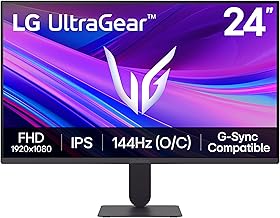
The LG 24G411A-B is positioned as an UltraGear gaming monitor on a 24-inch IPS panel. It delivers a native 120Hz refresh rate, with overclocking to 144Hz for faster, smoother motion in action-heavy scenes. The monitor sports 99% sRGB color coverage and HDR10 support, which enhances dynamic range for compatible content. NVIDIA G-SYNC compatibility and AMD FreeSync work together to reduce tearing and stutter, providing a consistent gaming experience while maintaining excellent color accuracy for everyday tasks.
The design emphasizes performance while keeping a compact footprint. If you want a monitor that blends gaming readiness with solid everyday use, this LG option offers a strong balance of speed, color depth, and compatibility with modern GPUs.
Buying Guide: Key Purchase Considerations
- Resolution and panel type: All five options use 1080p IPS panels, which deliver accurate colors and good viewing angles. If you primarily work with text and office apps, this resolution is typically crisp enough, though higher resolutions appeal to photo editing and multitasking needs.
- Refresh rate and motion handling: For productivity, 60–75Hz is adequate, but 120Hz or higher benefits gaming and fast-paced media. IPS panels with high refresh rates can reduce motion blur and improve perceived smoothness.
- Color accuracy and coverage: Look for sRGB and DCI-P3 coverage values to gauge color reliability. 99% sRGB and around 95% DCI-P3 are respectable targets for general design work and media consumption.
- Adaptive-Sync and compatibility: FreeSync/G-Sync compatibility helps reduce tearing in dynamic scenes. Ensure your graphics card supports the adaptive-sync standard used by the monitor.
- Ergonomics and stand design: Tilt, height adjust, or pivot features influence comfort during long sessions. Some models emphasize slim bezels for multi-monitor setups, while others focus on desk aesthetics.
- Connectivity: HDMI and DisplayPort are common, with VGA or USB-C in some models. Ensure the ports align with your PC, laptop, or console requirements.
- Response time and motion clarity: A fast response time minimizes ghosting in fast action. Consider models offering 1–5 ms MPRT/GTG if gaming is a priority.
- Energy use and eye comfort: Flicker-free technology and blue light filters support longer use without fatigue. HDR support improves contrast on compatible content, though HDR performance on many 24-inch panels may be limited by brightness.
In summary, a 24 inch IPS monitor is a versatile choice for a home office, student setup, or entertainment corner. The five models covered here emphasize strong color fidelity, smooth motion, and flexible design. Your final decision should align with how you balance gaming readiness, color-critical work, desk space, and connectivity with your existing devices.