Choosing the right 120mm RGB fan can dramatically improve your PC’s airflow while adding stunning customizable lighting that complements your setup. Below is a summary table featuring some of the best 120mm RGB fans available, highlighting their key attributes for quick comparison.
| Product | Brand | Key Features |
|---|---|---|
| Corsair RS120 ARGB PWM Fan | Corsair | Daisy-chain connection, 8 customizable LEDs, up to 2100 RPM, magnetic dome bearing |
| NZXT F120 RGB PWM Fan | NZXT | 18 individually customizable LEDs, fluid dynamic bearing, low noise, CAM software control |
| Antec 120mm RGB Case Fan (5-Pack) | Antec | 4-pin RGB, daisy chain, sleeve and fluid dynamic bearing, quiet operation, bright full-spectrum lighting |
| DARKROCK F120 3 in 1 Infinite Mirror Fans | DARKROCK | Infinity mirror design, ARGB lighting on blades and frame, PWM control, hydraulic bearing |
| ARCTIC P12 PWM PST A-RGB Fan | ARCTIC | 12 A-RGB LEDs, optimized static pressure, Y-splitter cables, semi-passive mode |
Corsair RS120 ARGB 120mm PWM Fan

The Corsair RS120 ARGB fan is designed for streamlined setup with its daisy-chain connection allowing multiple fans to be controlled from a single 4-pin PWM and +5V ARGB connector. It features eight bright LEDs per fan, customizable through compatible motherboard RGB control software. Operating at speeds up to 2,100 RPM, it provides airflow up to 72.8 CFM, excellent for maintaining thermal performance. The magnetic dome bearing promises low noise and durability, making it suitable for silent high-performance builds.
NZXT F120 RGB PWM PC Fan

The NZXT F120 RGB fan boasts 18 individually customizable RGB LEDs, providing vibrant synchronization effects via the CAM software. Its fan blade design balances static pressure and airflow, enabling whisper-quiet operation during demanding use. Controlled by PWM, it adjusts speeds for optimal cooling while maintaining low noise levels. Users will find it ideal for gaming setups or any PC requiring effective cooling with eye-catching aesthetics.
Antec 120mm RGB Case Fan – 5 Pack
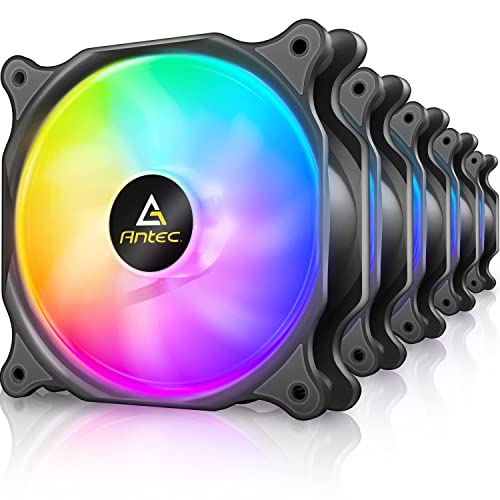
This Antec 120mm RGB fan pack includes five fans, perfect for bulk cooling needs. They utilize a 4-pin RGB interface with daisy chain technology to simplify cable management. These fans run quietly at just 21.5 dBA thanks to sleeve and fluid dynamic bearings. The full-spectrum RGB lighting delivers vivid colors to enhance the visual impact of your PC build, customizable through motherboard software controls.
DARKROCK F120 3 in 1 Infinite Mirror Case Fans

The DARKROCK F120 fans feature an infinity mirror design that creates multi-layered lighting effects on both the blades and frame. With PWM control, the fans operate between 800-1600 RPM for customizable cooling performance ranging from quiet to more aggressive airflow. The hydraulic bearing reduces noise and increases durability. Perfect for users seeking a striking visual element alongside reliable cooling.
ARCTIC P12 PWM PST A-RGB 120mm Fan

The ARCTIC P12 PWM PST A-RGB fan is optimized for static pressure, making it effective for heat sinks and radiators. It houses 12 digital A-RGB LEDs arranged evenly around the hub and rotor for rich illumination. Both fan and LED cables include integrated Y-splitters to simplify connecting multiple fans without clutter. It supports a semi-passive mode where the fan can stop under low temperatures, reducing noise further while maintaining optimal cooling during high load.
Buying Guide for 120mm RGB Fans
When selecting the best 120mm RGB fan for your PC, consider the following factors to balance performance and aesthetics effectively:
Airflow and Static Pressure
Airflow, measured in cubic feet per minute (CFM), determines how much air the fan moves. Higher airflow is crucial for open-air chassis cooling. Static pressure is important for pushing air through obstructions such as radiators or dense heatsinks; fans optimized for this have blades designed to force air through tight spaces. Choose based on where you’ll install the fan.
Noise Levels and Bearing Type
Noise can be a concern for quiet PC builds. Fans with fluid dynamic, magnetic, or hydraulic bearings generally operate more quietly and last longer than sleeve bearing fans. Review the noise level in decibels (dBA) if silence is a priority.
RGB Lighting Features
RGB lighting can range from simple presets to fully customizable LEDs. Check the number of LEDs, whether the fan supports motherboard RGB sync, and if it requires proprietary controllers or software. Advanced fans offer addressable RGB (ARGB) for detailed lighting effects and color control.
Fan Speed and PWM Control
Fans with PWM control allow your system to adjust fan speeds dynamically based on temperature, balancing silence and cooling. Consider the fan’s RPM range for flexibility, with some high-end fans reaching over 2000 RPM for maximum airflow when needed.
Cable Management and Installation
Look for features like daisy-chain connectors or integrated Y-splitters to reduce cable clutter and simplify installation, especially if you plan to install multiple fans. Confirm compatibility with your motherboard’s fan and RGB headers before purchase.
Durability and Warranty
Reliable fans use quality bearings and materials to ensure long service life. Brands often provide warranties covering hardware defects. Checking reviews for build quality and brand reputation can inform your purchase.